Introducing CloudThinker Review for Azure DevOps
Ranked #1 on independent code review benchmarks. Now available for Azure DevOps.
A pull request lands in Azure Repos at 4:40 p.m. on a Thursday. The branch policy wants one approval and a green build. The build goes green. The one reviewer who's free opens the diff, sees forty changed files, checks the parts they know and approves the rest on trust. The policy is satisfied. Nobody actually read the retry loop in the payment client.
CloudThinker Review now supports Azure DevOps, joining GitHub and GitLab as a fully supported platform. Every pull request gets a review that covers code quality, security, architecture and operational readiness. Those reviews run in parallel, then get synthesized into one prioritized review with a severity on every finding and a suggested fix. You can read the benchmark results here.
This post covers why branch policies alone leave that gap, how the integration works, and the three setup steps. For the full setup guide, see our documentation.
Why branch policies don't catch the bug
Azure DevOps branch policies are good at what they do. They're also rules, and a rule can't read code.
A policy counts approvals. It can't weigh them. "Minimum one reviewer" is met by a careful review and by a skim at 4:40 p.m. alike. The policy sees the same green check.
A build proves the tests pass, not that the tests are right. A race condition, a missing authorization check or an N+1 query usually passes every existing test, because nobody wrote the test that would fail.
Reviewer depth depends on who's around. The person who knows the auth module is on leave, in another time zone or in a release meeting. Review quality follows calendar availability, so it varies from one PR to the next.
Specialist review doesn't scale. A security review on every PR would need a security engineer on every PR. Most teams save it for the changes that look risky, and the risky ones are often the changes that don't look it.
How the integration works
01Source control
Azure DevOps
- Azure ReposCode (Read & Write)
- Pull request threadsPull Request Threads (Read & Write)
- PipelinesBuild (Read)
- Service hooksOne Web Hooks subscription per trigger
One PAT, three scopes
02Review
 CloudThinker
- Code qualityLogic, edge cases, error paths
- SecurityAuth, input handling, secrets
- ArchitectureCoupling, boundaries, drift
- Operational readinessLogging, failure modes, load
Synthesized into one review
03Where the team works
The pull request
- SummaryOverall assessment on the PR
- Inline threadsSeverity and a suggested fix on the line
- Branch policiesApprovals and builds stay yours
No new tool to open
Azure DevOps tells CloudThinker about pull request activity through service hooks. Each event arrives as a Web Hooks call, signed with the secret token CloudThinker gives you. The payload for a new pull request looks like this (trimmed):
{
  "eventType": "git.pullrequest.created",
  "resource": {
    "pullRequestId": 1482,
    "title": "Retry transient failures in payment client",
    "sourceRefName": "refs/heads/feature/payment-retry",
    "targetRefName": "refs/heads/main",
    "repository": {
      "name": "payments-api",
      "project": { "name": "Commerce" }
    }
  }
}
From there CloudThinker reads the diff and the surrounding code with your Personal Access Token, which is why the PAT needs Code (Read & Write). It reads build results with Build (Read). Findings go back as pull request threads, which is what Pull Request Threads (Read & Write) is for. An inline finding is a thread anchored to a file and line, the same object a human reviewer creates when they comment in the diff view:
curl -u ":$AZDO_PAT" \
  -H "Content-Type: application/json" \
  -X POST \
  "https://dev.azure.com/{organization}/{project}/_apis/git/repositories/{repositoryId}/pullRequests/1482/threads?api-version=7.1" \
  -d '{
    "comments": [{ "parentCommentId": 0, "content": "High: retry loop has no backoff or cap...", "commentType": 1 }],
    "status": 1,
    "threadContext": {
      "filePath": "/src/PaymentClient.cs",
      "rightFileStart": { "line": 88, "offset": 1 },
      "rightFileEnd": { "line": 96, "offset": 1 }
    }
  }'
You don't write that call. It's shown so you know exactly what the token is used for: reading code and builds, and writing review threads.
One pull request, end to end
01Event
PR opened
A developer opens or updates a pull request in Azure Repos.
02Hook
Service hook
The Web Hooks subscription posts the event to CloudThinker with your secret.
03Review
Parallel review
Quality, security, architecture and operations reviews run side by side.
04Answer
PR threads
One summary plus inline threads, each with a severity and a fix.
Here's an illustrative case. PR 1482 adds retries to a payment client after a week of transient timeouts from the card processor.
1. Start from what the change could break. A retry change has a few likely failure modes. It retries something that isn't safe to repeat. It retries forever and turns a slow dependency into a self-inflicted outage. Or it swallows the original error so the next incident is harder to read. Each one shows up in a different place in the code.
2. Check each one against the code. The security and logic reviews look at what's being retried: a POST /charges call with no idempotency key, so a retry after a timeout can charge a card twice. The operational review looks at the loop: no backoff and no cap, so a processor outage becomes a request storm. The architecture review notices a second retry helper already exists in a shared library, and this PR adds a new one.
3. One review, ranked. The developer doesn't get four separate bot comments. They get a summary with the overall assessment, then inline threads in priority order: the missing idempotency key as Critical, the unbounded loop as High, the duplicate helper as Low, each with a suggested fix.
4. The human review gets shorter, not skipped. The reviewer opens the PR after the fixes are in. They spend their time on what the change is for, not on finding the double-charge bug.
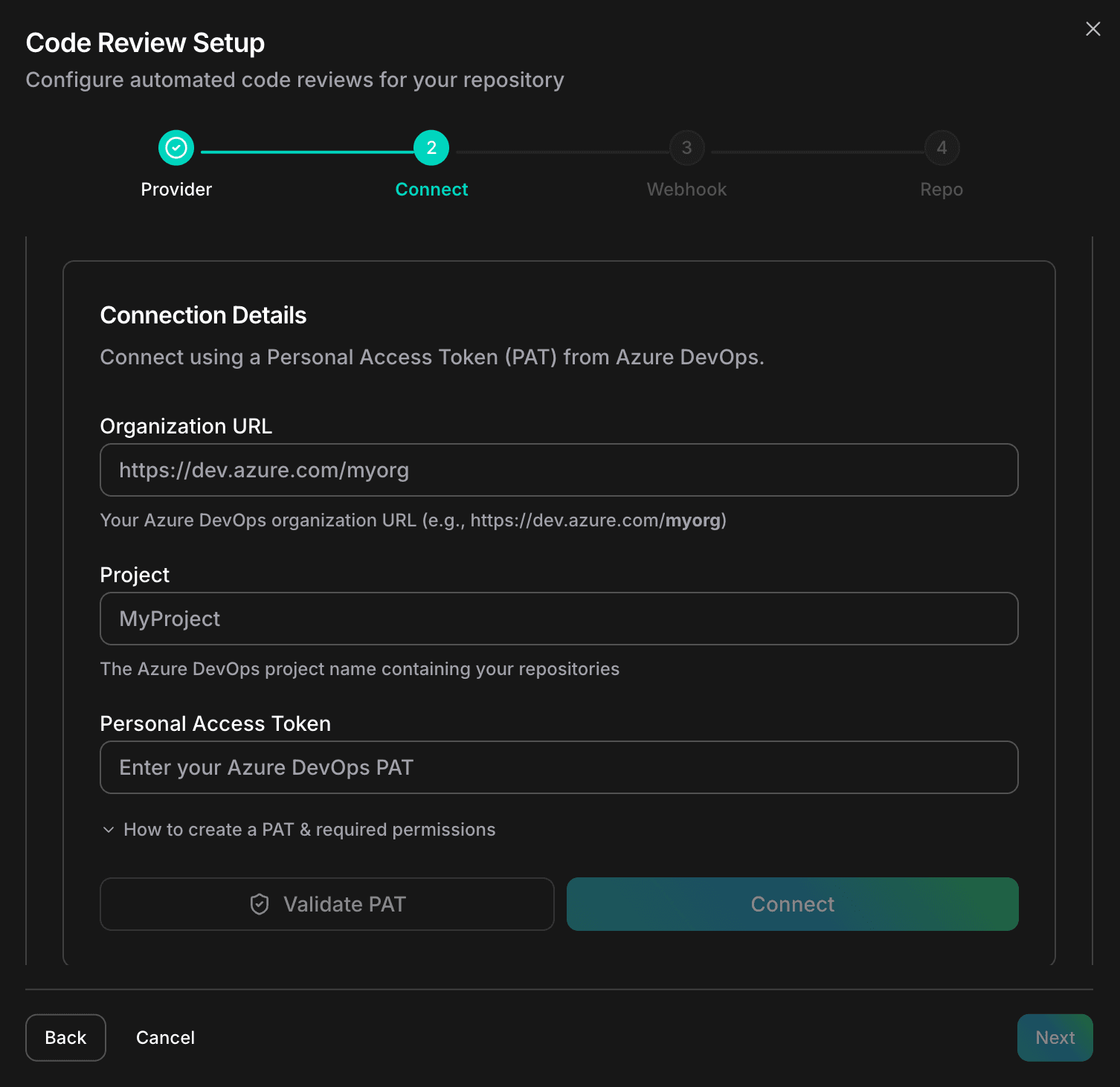
Step 1: Connect your Azure DevOps organization
Head to app.cloudthinker.io/code-review and select Azure DevOps.
Enter your Organization URL, Project name and a Personal Access Token. Generate the PAT from your Azure DevOps User Settings with these scopes: Build (Read), Code (Read & Write) and Pull Request Threads (Read & Write). Nothing broader is needed.
Click Validate PAT to verify, then Connect. If you'd like to check the token yourself first, this call should return your repositories:
curl -u ":$AZDO_PAT" \
  "https://dev.azure.com/{organization}/{project}/_apis/git/repositories?api-version=7.1"
Step 2: Configure the webhook
After connecting, CloudThinker shows the webhook details you need: the URL, the Secret token and the Triggers to subscribe to. Azure DevOps needs a separate service hook subscription for each event type, so you'll create one per trigger listed.
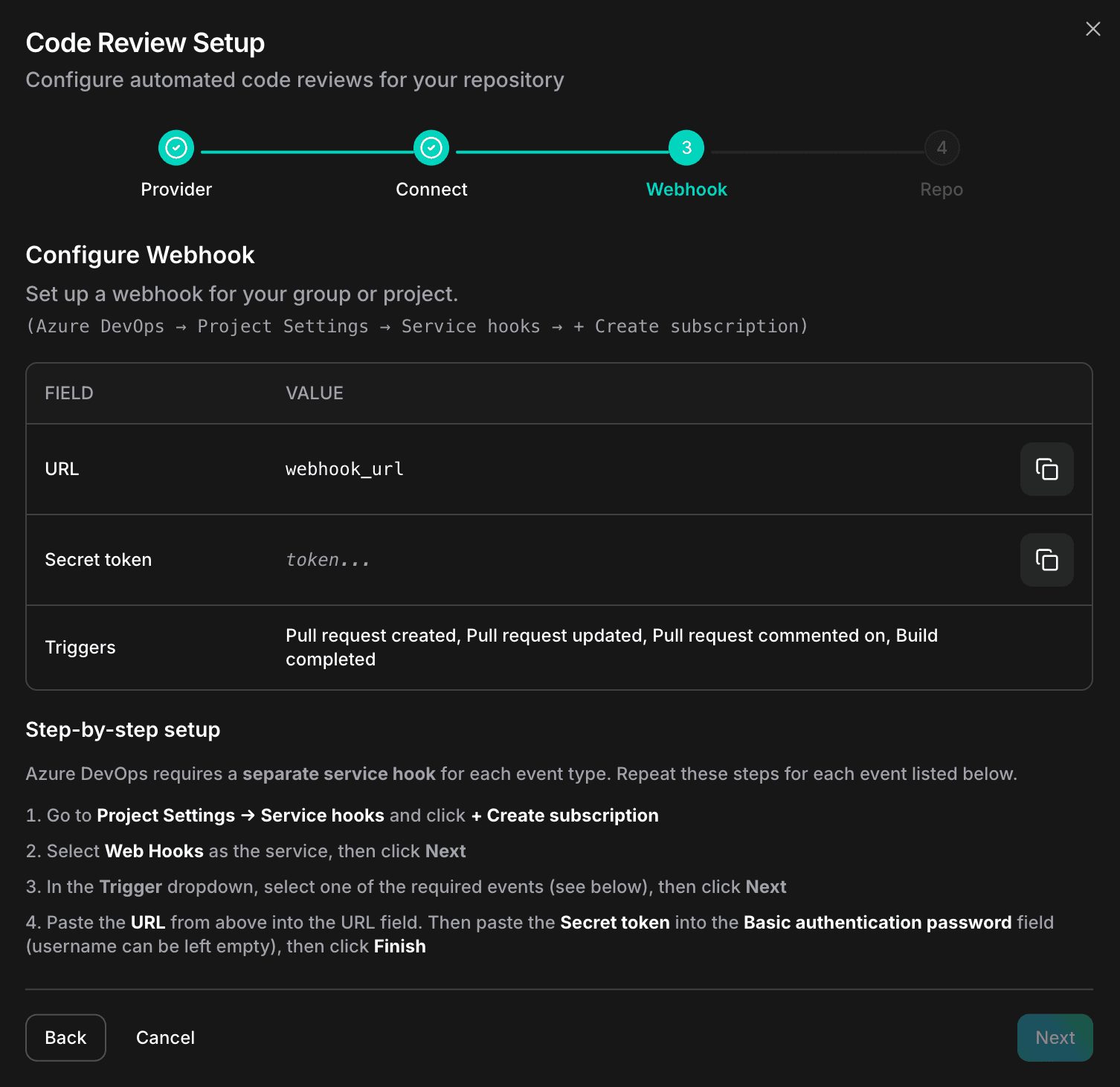
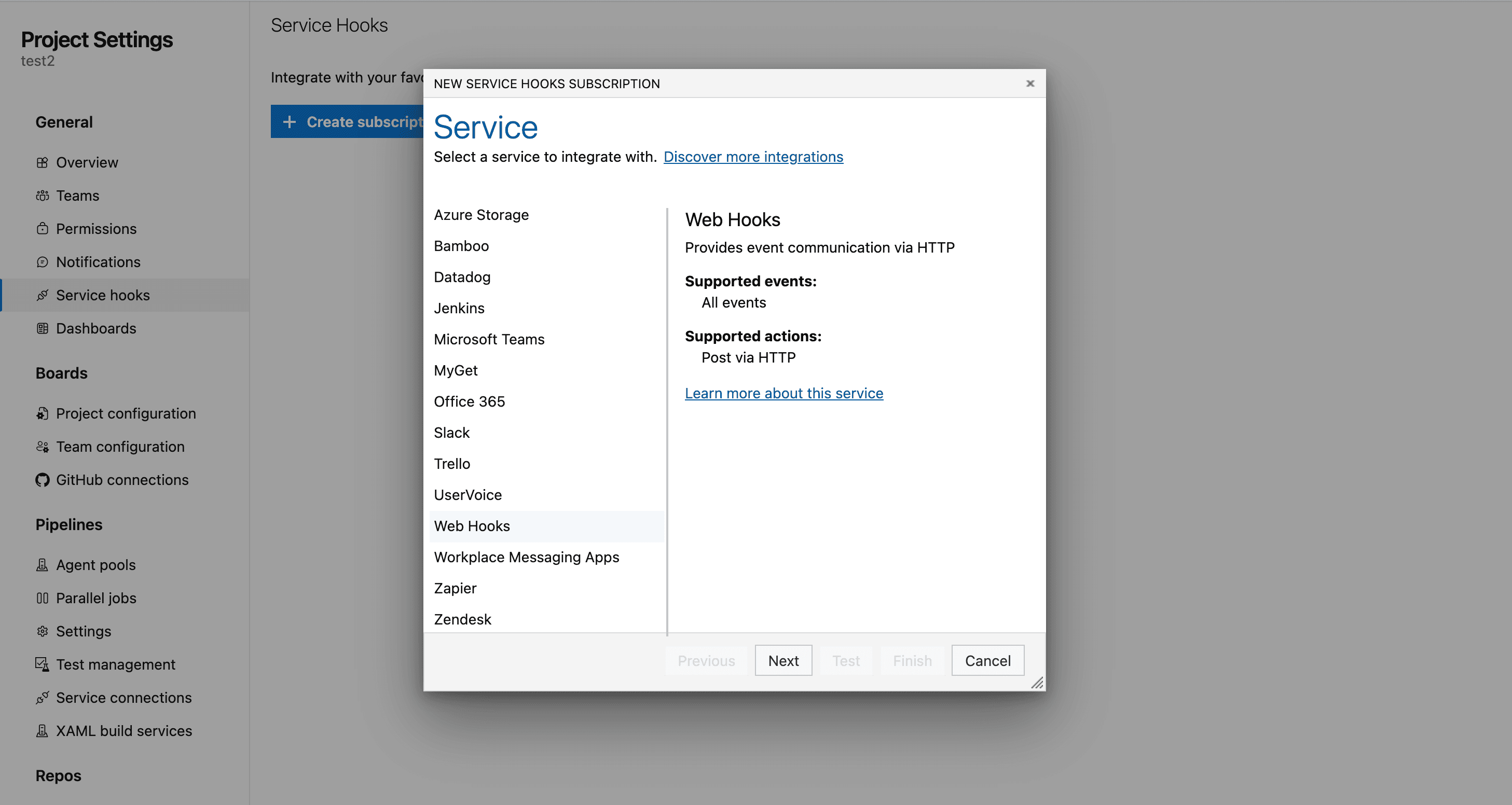
In Azure DevOps, go to Project Settings > Service Hooks > + Create subscription, select Web Hooks, pick the trigger, and paste the URL and secret token from CloudThinker. Repeat for each trigger. You can filter a subscription to one repository or target branch if you want to start small.
Step 3: Create your first pull request
Open a pull request in your connected repository. CloudThinker picks it up automatically and within minutes posts its findings on the PR: a summary with the overall assessment, plus inline comments tagged with the review area and severity.
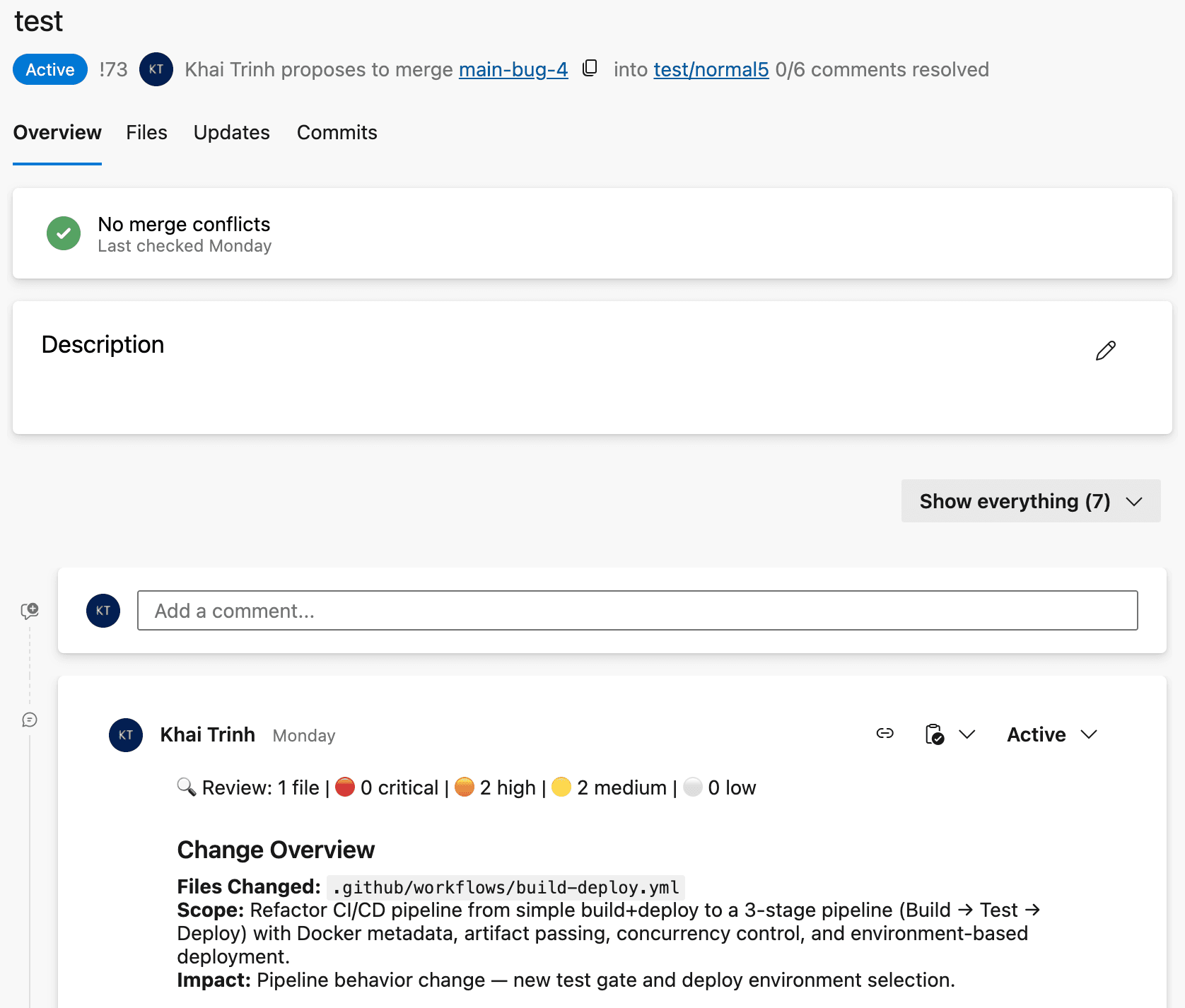
If nothing shows up after a few minutes, check the service hook's history in Project Settings > Service Hooks. A failed delivery there usually means a typo in the URL or secret.
Why this beats branch policies alone
| Branch policies alone | With CloudThinker | |
|---|---|---|
| What's checked | Approval count, build status, linked work items | The code itself: logic, security, architecture, operations |
| Review depth | Depends on who's free that day | The same depth on every PR |
| Security review | Saved for PRs that look risky | On every PR |
| Findings | Free-text comments, if any | Ranked by severity, each with a suggested fix |
| Reviewer time | Spent finding bugs | Spent on intent and design |
| Platforms | Azure DevOps only | The same review on Azure DevOps, GitHub and GitLab |
The deeper difference is what each layer is for. Branch policies decide whether a PR is allowed to merge. CloudThinker reads the change and tells you what's wrong with it. You keep both: the policy still gates the merge, and the human approver now has a review worth approving against.
Same review, new platform
This is the same review already running on GitHub and GitLab, with the same review areas and the same severity model. Teams with repositories on more than one platform get consistent findings everywhere. On a GitLab merge request or an Azure DevOps pull request, a Critical means the same thing.
Related reading
- What takes your team days, AI does in minutes: the code review benchmark
- CloudThinker makes GitLab autonomous
- CloudThinker Connections: how we securely connect to your infrastructure
- Review: AI code review
Start your free trial or book a demo to see AI code review on your own Azure DevOps repositories.