Frontier Investigation Agents


Own complex systems with confidence.
CloudThinker investigates issues across code, data, infrastructure and cost. It shows you the evidence and helps you decide what to do next.
Read-only to start. You decide what runs.
Investigating production issues for teams at




From scattered signals to a clear decision.
An issue can cross code, data, infrastructure and cost. CloudThinker connects the evidence so your team can check the findings and choose the next step.
FIG 0.1
What we do
Investigate across the stack.
Agents connect findings from your code, databases, infrastructure and cloud costs.
FIG 0.2
What changes
One investigation. Shared evidence.
Bring monitoring signals, logs, tickets and team discussions into one investigation, so everyone can work from the same evidence.
FIG 0.3
The value
Decide with confidence.
Review the findings, supporting evidence and proposed fix, including rollback steps. Your policies control changes, and the activity record shows what happened.
Understand the issue. Find the cause.
An issue can start in code, affect the database and drive up cloud costs. CloudThinker investigates across your tools, so your team can see how it all connects.
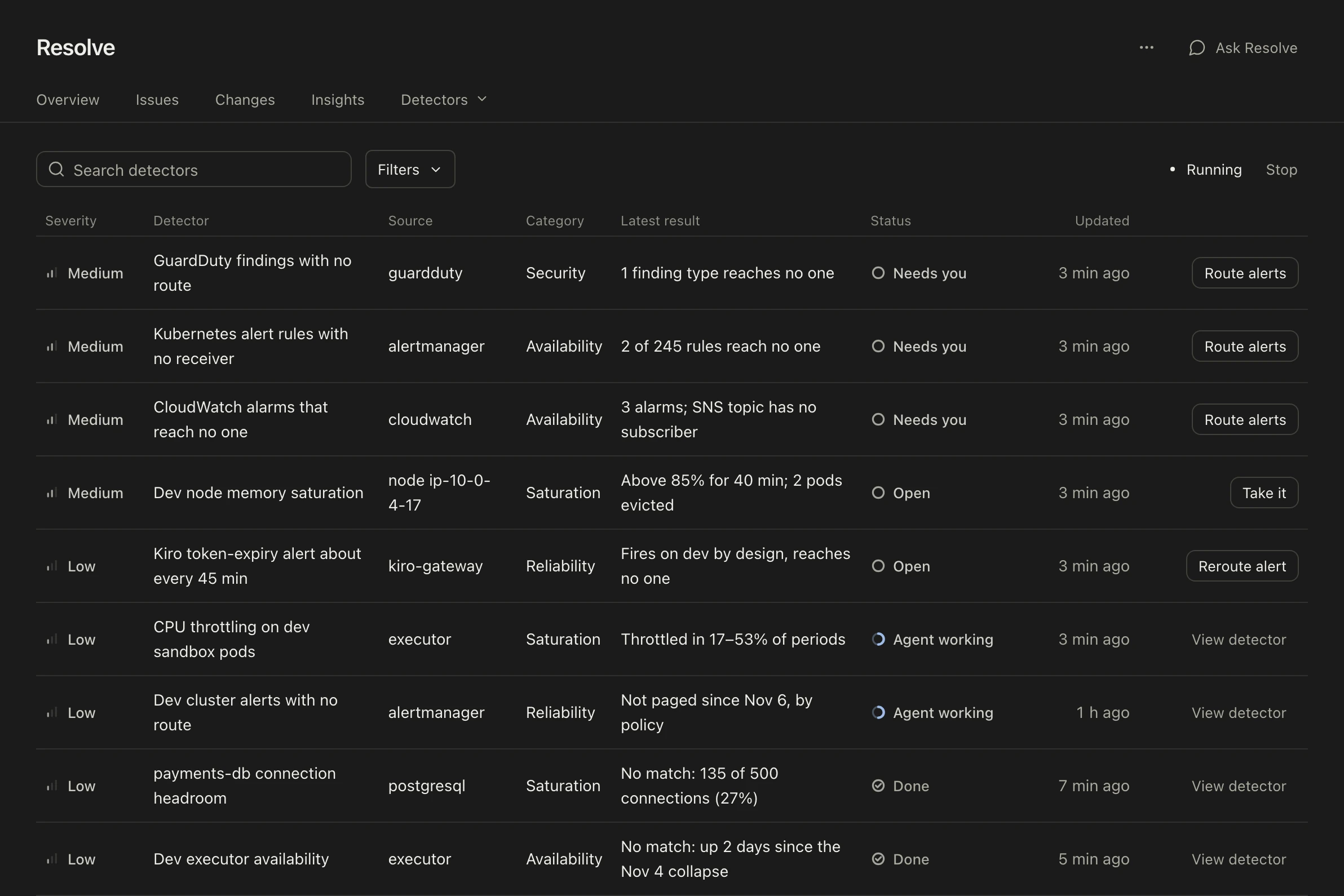
Detectors check your connected tools for security risks and early signs of an incident.


Agents for your engineering work.
Use specialist agents for incidents, code review, security, cloud costs and routine tasks. They share context to keep the work connected.
Explore connectionsFind the cause of an incident, see who is affected and review a fix with a rollback plan.
Explore Resolve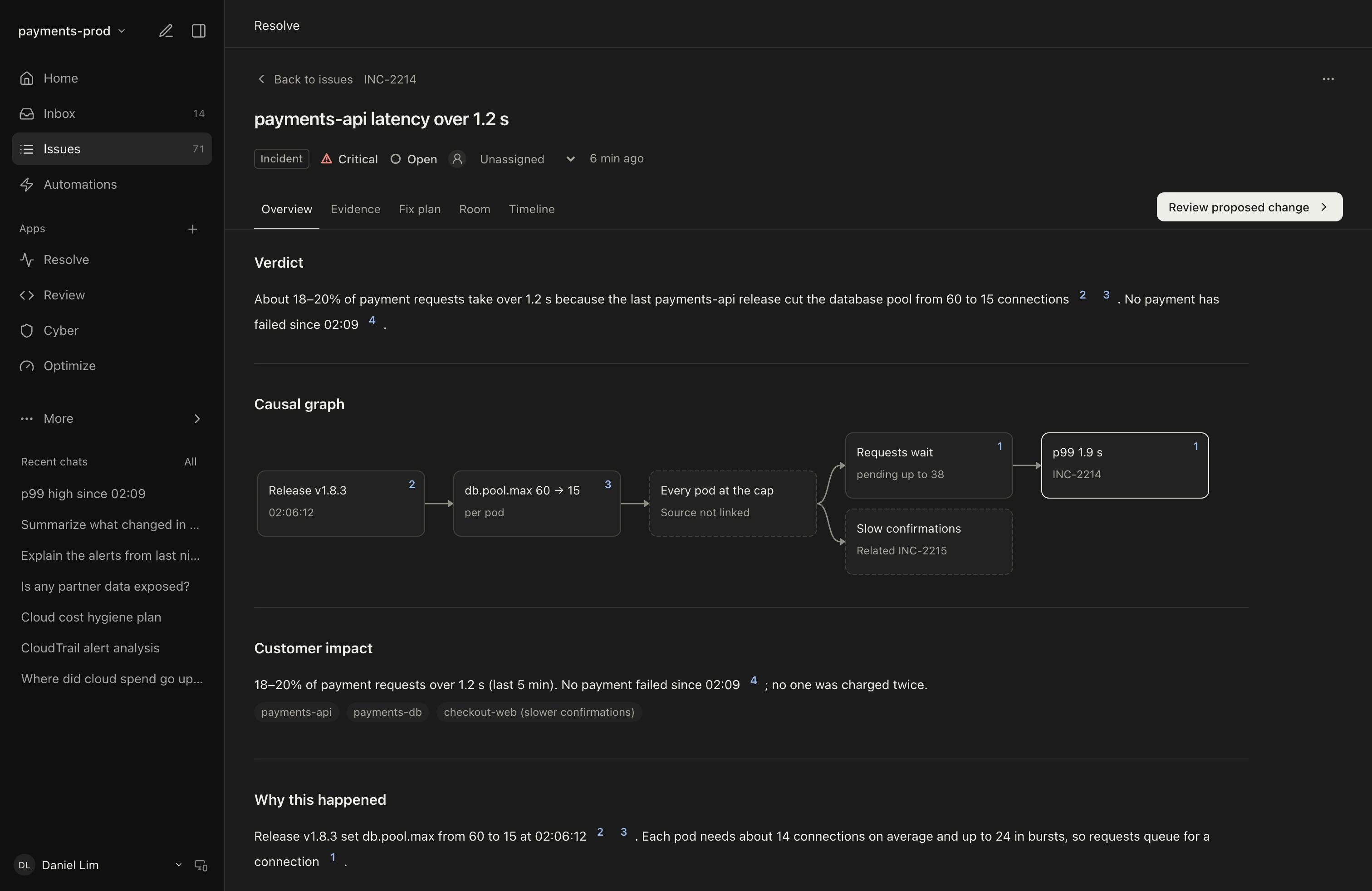


Use the tools your team already knows.
Connect your cloud, monitoring and ticketing tools. Ask questions and get updates in Slack or Microsoft Teams.
See all connectionsAsk in Slack or Teams.
Mention @CloudThinker in a channel and continue in the thread. Get alerts and review summaries there too.
Keep incident response in one room.
When an incident triggers an on-call alert, CloudThinker opens an Incident Room. You can also configure a dedicated Slack channel.
Start investigating from PagerDuty.
PagerDuty sends an incident to Resolve. CloudThinker opens the incident record and starts investigating the cause.
Keep tickets up to date.
Use context from Jira, ServiceNow and Linear. Ticket updates follow your approval policies.

Chat and tickets


Monitoring


Cloud and code


Deployment options for your team.
Start with CloudThinker Cloud. Use BYOS (bring your own sandbox) for local file and shell tasks. Dedicated and self-hosted deployments are in early access on Enterprise.
FIG 1.1
CloudThinker CloudAvailable now
CloudThinker manages the platform. Connect your tools and choose the access agents get.
FIG 1.2
BYOSBeta
Run file and shell tasks on your machines. The file contents agents read and command output still go to CloudThinker Cloud and the model. Connection credentials stay in the cloud.
FIG 1.3
Dedicated cloudEnterprise
A single-tenant instance hosted by CloudThinker. Available regions are confirmed during onboarding.
FIG 1.4
Self-hostedEnterprise
Run CloudThinker in your cloud account or data center. Air-gapped options and requirements are agreed during onboarding.
Pasted secrets are checked before messages are sent.
Credentials are encrypted at rest.
SSO, SCIM, audit logs and your own model key on Scale and Enterprise.
Read the security overviewSee the evidence. Stay in control.
See what CloudThinker checked, where it is uncertain and what a change will do. Give agents more autonomy when you're confident in the results.
Read-only to start.
Agents start with read-only access to the systems you connect. You choose when to allow changes.
Clear about uncertainty.
Verified facts and hypotheses are shown separately. If evidence is missing, CloudThinker says so.
Changes follow your policy.
Set which changes need approval. The activity record shows what was proposed, approved, run and verified.
Proven in production.
BankingEnterpriseFintechStartups
CloudThinker investigated issues from a few months back whose root cause we never understood. Now our operations team works agent first, with CloudThinker.
Gia Hieu DinhCIO, F8863%Lower tooling costs. Operations tasks that took hours now take minutes. ~97%Code review precision on real merge requests, with full backend logic coverage.80%Less work for the operations team.
Frequently asked questions.
What is CloudThinker?
CloudThinker is an AI agent platform for engineering teams. It investigates issues across code, data, infrastructure and cost, shows the evidence and proposes a fix. Your team controls what runs. Use it for incidents, code reviews, security findings, cost changes and routine operations.
What can the agents change in production?
Agents start with read-only access to the systems you connect. Changes need approval unless your policy allows them to run automatically. Detected secrets can be redacted before sending, and known credential values are masked in agent output. The investigation record keeps the checks, actions and approvals.
What if the agent is wrong or uncertain?
Review the checks and evidence in each investigation. If there isn't enough evidence, CloudThinker marks the result Not Found or Cause unproven. Admins can mark diagnoses as right or wrong. Resolve Insights tracks root cause accuracy and false positives on your incidents.
Can we use our own cloud and AI model?
Enterprise offers self-hosted and air-gapped deployments through early access, with the model setup agreed during onboarding. On Scale, CloudThinker hosts the platform and you can use your own model key. BYOS uses Environments to run file and shell tasks on your machines, but read content and command output still go to CloudThinker Cloud and the model. Connection credentials remain in the cloud.
Will a CloudThinker outage affect our production?
CloudThinker agents run outside the path of your application traffic. An outage can pause investigations and agent tasks. Scale includes a 99.9% uptime SLA and Enterprise 99.95%. Recovery objectives are available on request through the Trust Center.
Which tools can we connect?
Connect the tools your team uses, including AWS, Google Cloud, Azure, Kubernetes, Datadog, Prometheus, Grafana, PagerDuty, Slack, GitHub and GitLab. Setup time depends on the connections and access approvals you need.
How does CloudThinker perform on public benchmarks?
On the public SREGym-Lite leaderboard (checked November 15, 2026), CloudThinker on GPT-6 Astra (low) resolves all 17 faults end to end and ranks fourth. Six runs from four agents reach 100%, and the three ranked ahead diagnose faster. The faults run in three open-source demo apps, so the best test is a replay of one of your own incidents.
Is CloudThinker SOC 2 compliant?
Yes. CloudThinker has a SOC 2 Type II report covering Security. It is also an AWS Advanced Tier Services Partner with the AWS AI Services Competency. See the Trust Center for details.
A teammate engineers can trust.
Build stronger systems without overloading the people who run them.