Introducing CloudThinker Optimize: From Cost Anomaly to Landed Fix, on a Daily Loop
The quarterly cost review opens on the same slide as last quarter. Compute Optimizer still says seven EC2 instances are over-provisioned. Trusted Advisor still lists the expired Savings Plan coverage. Everyone in the room agrees the fixes are right. Nobody in the room owns the Terraform module, and the person who does is two weeks from a launch. The "potential savings" number on the dashboard grows again.
Today we're announcing CloudThinker Optimize, a daily-running cost optimization specialist. It watches your AWS and GCP accounts, detects spend anomalies, isolates the cost driver, traces the root cause, opens the fix as a Merge Request in your team's normal review queue, and learns from every approved change. It runs on the same primitives as the rest of the CloudThinker platform: Connections, Auto Mode and the Skills Library. The loop runs end to end without a separate tool, a separate console or a separate on-call.
Cloud cost tooling has spent the last decade getting better at showing you the bill. Optimize does the next step: it gives the bill an owner who works around the clock, follows up on findings, and ships the change.
This post covers the five-phase CostOps loop the agent runs every day, the daily dashboard it produces for AWS and GCP, a walkthrough on a representative AWS Bedrock and EC2 footprint, a comparison with the tools most teams already run (AWS Cost Explorer, Compute Optimizer, Trusted Advisor, CloudHealth, Datadog Cloud Cost Management, Apptio Cloudability, Vantage and Kubecost), and how to turn it on in under thirty minutes.
By the end you'll know:
- Why dashboards and recommendation engines stall at flagged and never reach fixed
- The five phases of the CostOps loop: Abnormal, Cost driver, Root cause, Resolve with approval, Learn
- How the agent covers AWS (CUR, Cost Explorer, Compute Optimizer, Trusted Advisor, EC2, EKS, RDS, S3, Bedrock) and GCP (BigQuery billing export, Recommender, GKE, Cloud SQL, Cloud Storage, Vertex AI)
- How Auto Mode lets you decide which fixes land on their own and which wait for approval
- How it compares with the eight tools most teams have already deployed
The challenge: most FinOps stacks stall at "flagged"
Almost every cloud cost program in 2026 looks the same in cross-section. There's a billing export, a dashboard, a weekly review and a Confluence page of recommendations nobody has time to action. The work is split across three roles, and the handoffs between them are where the money sits:
01Finance
Owns the number
Gets the invoice, the chargeback and the forecast. Can’t delete an idle instance.
02Platform
Owns the guardrails
Ships tagging policies, SCPs and budgets. Can’t audit 800 workloads a quarter.
03Workload owner
Owns the resource
Can resize, re-shape or commit. Is also shipping the next feature on a deadline.
- The finance team owns the number. They get a monthly invoice, a chargeback report and a forecast. They aren't in a position to delete an idle EC2 instance.
- The platform team owns the guardrails. They can deploy a tagging policy, an SCP, a budget alert. They can't, in practice, audit 800 workloads a quarter for right-sizing.
- The workload owner owns the resource. They can resize the cluster, change the instance type, move to a Savings Plan. They're also the one shipping the next feature, on a deadline.
Native and third-party cost tools sit on top of this split and emit findings into it. AWS Trusted Advisor flags idle resources. AWS Compute Optimizer recommends right-sizing. CloudHealth, Apptio Cloudability, Vantage and Datadog Cloud Cost Management aggregate and slice. Kubecost itemizes container spend. None of them know who owns the workload. None of them open the pull request. None of them follow up the next day to ask why the change hasn't landed.
That's structural. A recommendation engine's unit of output is a finding, and a finding has no owner, no diff and no deadline. A static threshold catches the spike at month close, after it has compounded. A per-resource recommendation can't say why the resource got bigger, so the owner has to reconstruct the history before trusting the advice. And the knowledge of which fixes are safe lives in two senior engineers' heads.
The result is the pattern every FinOps lead recognizes: a recommendation backlog that grows faster than it shrinks, a "potential savings" figure that never turns into a smaller invoice, and a quarterly review where the same five findings keep coming back because the workload owner has been heads-down on a launch.
Optimize is built for that gap. It owns the loop from anomaly to landed Merge Request, and stays on it when human attention doesn't.
Solution overview: the five-phase CostOps loop
Optimize doesn't produce a longer list of recommendations. It runs a closed loop, every day, on every connected AWS account and GCP project. Each phase is a distinct unit of work that used to belong to a different person.
01Abnormal
Same day
Hourly billing data against a per-service, per-tag baseline.
02Cost driver
Recoverable $
Workload, team, SKU and deployment, ranked by avoidable spend.
03Root cause
The commit
Deploys, IaC changes and traffic tied to the spike in a Deep Dive.
04Resolve
Merge Request
The diff, the evidence and the rollback, in your normal review queue.
05Learn
Fix attached
The next similar finding arrives with the approved fix already drafted.
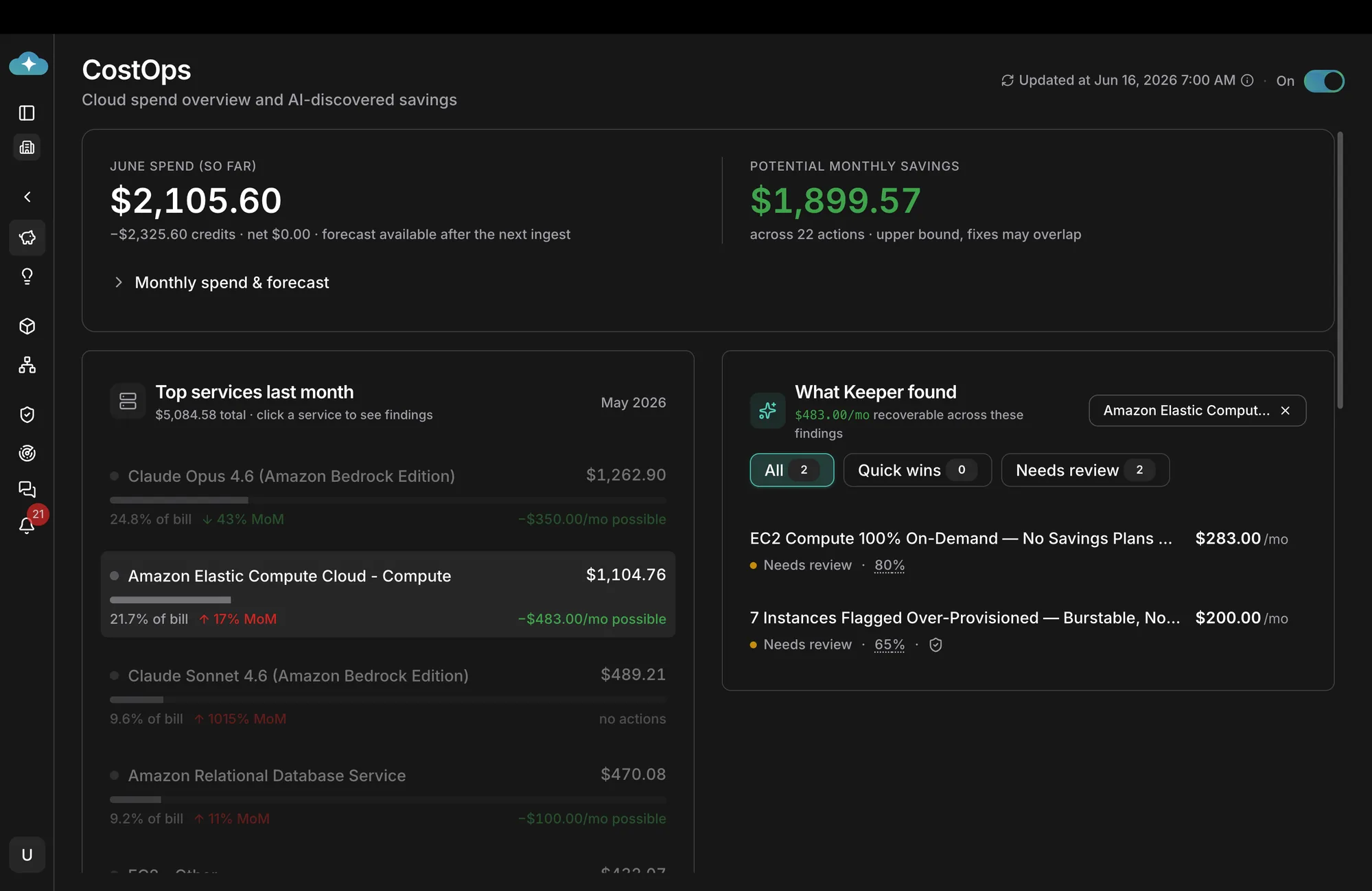
The screenshot is the morning view from an active Optimize run on a connected AWS account. The header tiles show month-to-date spend, the potential monthly savings the agent has found, and the number of open findings ready to action. The body breaks down top services by month-over-month delta, and the right panel lists every open finding by service. Nothing on the page was assembled by hand.
Phase 1: Abnormal. Detect the anomaly within the day, not the month
Native tools detect anomalies on the invoice. Optimize reads the AWS Cost and Usage Report (CUR) and the GCP BigQuery billing export hourly, builds a per-service, per-region, per-tag baseline, and flags deviations within the same business day. In the dashboard above, Amazon Elastic Compute Cloud is up 17% month-over-month. The agent caught the inflection on the third day of the month, not at month close. Amazon RDS is up 11% MoM. Both were flagged before the spend had compounded.
The agent watches more than the dollar value. It tracks unit economics (cost per request, cost per active user, cost per inference for Bedrock and Vertex AI) and flags drift in the ratio even when raw spend looks flat. A 1015% jump in Claude Sonnet 4.6 usage on Bedrock with a steady end-user count is a different finding from a 1015% jump that tracks a new product launch. The agent labels the two differently.
Phase 2: Cost driver. Isolate what's pulling the bill up
A flagged anomaly is the start, not the answer. The agent walks the dependency graph: which workload, which team, which feature flag, which deployment, which SKU. In the screenshot, the EC2 anomaly decomposes into the two findings on the right: a coverage gap (the workload is 100% On-Demand with no Savings Plans coverage, leaking $283/mo) and a sizing gap (7 instances over-provisioned against observed CPU and memory, leaking $200/mo). The agent ranks drivers by recoverable dollars, not raw cost. The cheapest service can still be the biggest source of avoidable spend.
Phase 3: Root cause. Trace the why behind the what
The "what" is the SKU. The "why" is the change that made it expensive. The agent cross-references the cost spike with deployment events from your CI/CD provider, infrastructure-as-code changes from your Terraform or Pulumi state, recent IAM policy changes, and traffic patterns from your APM. For the over-provisioned EC2 finding, it ties the spike to the workload's Auto Scaling group, the launch template version that bumped the instance class, and the Terraform PR that introduced it. The output is a Deep Dive report: a phased, evidence-backed explanation that names the commit, the engineer, the workload and the corrective action.
Phase 4: Resolve. The agent ships the change, behind the approval gate you choose
Every finding ends in a Merge Request in the team's normal review queue. The MR includes the code or configuration diff, the Deep Dive that produced it, the live-state verification the agent ran before opening it, and the rollback path. What happens next goes through Auto Mode, so you decide what merges on its own and what waits for approval. Idle resource cleanup and a Savings Plans purchase aren't the same kind of decision, and you don't have to treat them the same way. It's the same trust model the rest of the platform uses for incident response and code review.
Phase 5: Learn. The next similar finding arrives with the fix attached
Every approved Merge Request feeds the platform's memory. When the next workload develops the same 100%-On-Demand pattern, the agent doesn't file a fresh "needs review" finding. It arrives with the prior fix already proposed, linked to the original case, with the diff scoped to the new workload's parameters. The knowledge that used to live in two senior engineers' heads becomes part of the agent's working memory. The hundredth Savings Plan is almost free.
How it covers AWS and GCP
Optimize reads from both providers' native cost and observability surfaces, and acts through their native APIs. There's no agent installed inside a customer cluster, no sidecar to deploy and no schema to maintain.
01Cost and usage
Your clouds
 AWSCUR, Cost Explorer, Compute Optimizer, Trusted Advisor
 Google CloudBigQuery billing export, Recommender
- IaC stateTerraform or Pulumi changes
Read-only billing role
02Analysis
 Optimize
- Detect and decomposeBaseline, cost driver, unit economics
- Deep DiveNames the commit and the change
- Pre-staged fixDiff, live-state check, rollback
Part of CloudThinker
03Where the team works
Review queue
 GitLabMerge Request with the Deep Dive
 GitHubPull request, same evidence
 SlackSummary to the owning team
Owner from CODEOWNERS
AWS coverage
- Cost surface. AWS Cost and Usage Report (CUR) hourly; Cost Explorer API for historical baselines; AWS Cost Anomaly Detection as a corroborating signal.
- Recommendation surface. AWS Compute Optimizer for EC2, Lambda, EBS and Auto Scaling; AWS Trusted Advisor for idle resources and Reserved coverage; Bedrock model invocation logs for inference cost attribution.
- Runtime surface. EC2 right-sizing, Auto Scaling group resizing, EBS volume modification, S3 lifecycle policies, RDS instance class downgrades, EKS node pool re-shaping, Savings Plans purchase recommendations, Reserved Instance recommendations, Lambda right-sizing, Bedrock model selection (Opus → Sonnet → Haiku where the prompt allows it).
GCP coverage
- Cost surface. BigQuery billing export with detailed usage cost; Cloud Billing API for the live monthly figure.
- Recommendation surface. Google Cloud Recommender for VM right-sizing, idle VM cleanup, committed-use discounts and GKE optimization.
- Runtime surface. Compute Engine right-sizing, GKE node pool optimization (including Autopilot conversion candidates), Cloud SQL instance class adjustment, Cloud Storage lifecycle and storage class migration, BigQuery slot reservation right-sizing, Vertex AI model selection.
Both surfaces converge into a single view of spend, with one ranked list of findings, one daily report and one set of Merge Requests. The team doesn't have to pick a "primary" cloud.
Inside the investigation: why EC2 went up 17%
A 17% month-over-month jump on EC2 has at least three readings, and each predicts something different:
- Real growth. Traffic went up and the fleet followed. Predicts cost per request roughly flat. Nothing to fix.
- Lost discount. Same usage, worse price. Predicts Savings Plans coverage dropping while instance-hours stay level.
- Bigger instances. Same traffic, more capacity per request. Predicts a change in instance class and low observed utilization.
The agent checks each one against the account, using the same APIs you'd use by hand. First, the service-level split:
aws ce get-cost-and-usage \
  --time-period Start=2026-09-01,End=2026-10-01 \
  --granularity MONTHLY \
  --metrics UnblendedCost \
  --group-by Type=DIMENSION,Key=SERVICE
Cost per request from the APM is flat for the prior month and up this month, so reading one is out. Then coverage:
aws ce get-savings-plans-coverage \
  --time-period Start=2026-09-01,End=2026-10-01 \
  --granularity DAILY
Coverage on the workload drops to zero on the day a one-year compute Savings Plan expired. Reading two holds, and it explains part of the jump. Then sizing:
aws compute-optimizer get-ec2-instance-recommendations \
  --filters name=Finding,values=Overprovisioned
Seven instances come back over-provisioned. Their launch template moved from m6i.large to m6i.2xlarge in a Terraform PR merged eleven days earlier, and P99 CPU since then is 38%. Reading three holds too. Two causes, two findings, two separate fixes, each with its own owner, diff and rollback. A recommendation engine would have shown the second and third as unrelated line items with no history.
A daily walkthrough
The walkthrough below comes from a representative production environment running a Bedrock-heavy AI workload on AWS. Timestamps are minutes after the daily 07:00 ingest, the same one shown in the dashboard screenshot.
- T+00:00. The daily ingest runs. The agent reads the previous day's CUR partition, the GCP billing export delta, the Compute Optimizer recommendation set, and the Auto Scaling and deployment events from the connected AWS accounts.
- T+00:02. The agent rebuilds the per-service, per-tag baseline. Two anomalies are flagged: Amazon Elastic Compute Cloud is +17% MoM, Amazon RDS is +11% MoM.
- T+00:04. Cost-driver decomposition runs. The EC2 anomaly splits into two findings: a Savings Plans coverage gap ($283/mo recoverable) and an over-provisioning gap on seven instances ($200/mo recoverable). The RDS anomaly resolves to a single right-sizing finding ($100/mo recoverable).
- T+00:06. The root-cause Deep Dive runs on each finding in parallel. The over-provisioning finding traces to a Terraform PR merged eleven days ago that bumped the instance class from
m6i.largetom6i.2xlarge; the workload's observed P99 CPU is 38%. The Savings Plans gap traces to a one-year compute SP that expired last month. - T+00:09. The dashboard updates: $1,899.57 recoverable across 22 actions, of which 2 are new and 20 are still open from prior days. The owning team (identified by the Terraform module's CODEOWNERS) gets a Slack message with a one-paragraph summary, a link to the Deep Dive and the pre-staged Merge Request.
- T+00:12. The team lead approves. The agent merges the Terraform change, the Auto Scaling group rolls one instance at a time, live-state verification runs after each, and the dashboard updates as the savings are realized.
- T+24:00. The next morning, the Learn phase records the approved fix. The next workload that develops the same 100%-On-Demand pattern will arrive with the Savings Plans diff already drafted.
The same loop runs the next day, and the next. The dashboard's "Updated at" timestamp is the most important number on the page.
How Optimize compares to the existing solution landscape
The cost-tooling market has three tiers. Most of what's deployed today sits in the first two, and both stop in the same place: a flag in a dashboard. Optimize is the third tier. It doesn't replace the first two. It composes with them, adds the deep analysis, ships the resolution and learns from the outcome.
Tier 1: Rule-based detect and flag
The legacy of cloud cost management. Static thresholds, scheduled scans, and a list of findings on a tab nobody opens. Broad coverage, useful as a source of signals, structurally unable to act.
| Tool | What it does | Where it stops |
|---|---|---|
| AWS Trusted Advisor | Threshold-based checks for idle resources and low Reserved coverage. | Flag only. No driver attribution. No MR. |
| AWS Compute Optimizer | ML-derived right-sizing recommendations for EC2, Lambda, EBS, Auto Scaling. | Recommend only. No root-cause attribution to a commit. No MR. |
| GCP Recommender | Right-sizing, idle VM and committed-use discount recommendations. | Recommend only. AWS surface is out of scope. |
| CloudHealth (VMware) | Multi-cloud aggregation, chargeback, governance reports. | Report layer. No runtime action. No agent. |
| Apptio Cloudability | Multi-cloud cost analytics, commitment management. | Heavy reporting, light action. No code-and-config MR. |
| Vantage | Multi-cloud cost dashboards, per-service breakdowns, alerts. | Reporting and alerts. No agent that ships the change. |
| Kubecost | Per-namespace, per-pod Kubernetes cost attribution. | Strong attribution; no MR; no Bedrock or Vertex AI coverage. |
Tier 2: AI anomaly detection and flag
The "we put AI on it" tier. A learned baseline replaces the static threshold, which catches more anomalies earlier. But the output is still a flag in a dashboard, and a person still has to do the investigation, the chasing and the change.
| Tool | What it does | Where it stops |
|---|---|---|
| AWS Cost Anomaly Detection | ML-derived baseline on CUR; per-service and per-tag anomaly alerts. | Alert only. No driver decomposition. No MR. |
| Datadog Cloud Cost Management | Cost correlated with observability metrics; AI-derived anomalies on top of the same per-team views. | Surfaces in the dashboard. Doesn't file the fix. |
Tier 3: Agentic, on top of what you already run
Optimize doesn't replace Tier 1 or Tier 2. It reads from them: Trusted Advisor's flags, Compute Optimizer's right-sizing math, GCP Recommender's CUDs, Cost Anomaly Detection's per-tag spikes, Datadog's per-team correlations. Those become inputs. The agent then does the work the other tiers structurally can't (deep analysis, resolution and learning) and writes back into the team's normal Git, Slack and ticketing queues.
| Layer | Tier 1 (rule-based) | Tier 2 (AI flag) | Tier 3 (Optimize) |
|---|---|---|---|
| Detect | Static thresholds | Learned baseline | Composes both; cross-references deployments and IaC |
| Decompose driver | No | No | Workload, team, SKU, feature flag, deployment |
| Root cause | No | No | Names the commit, the engineer, the change |
| Open Merge Request | No | No | Code-and-config diff, live-state verified |
| Approval gate | No | No | Yes, through Auto Mode |
| Learn from outcome | No | No | Next similar finding arrives with the prior fix attached |
You don't have to throw away what you already have. Trusted Advisor keeps flagging. Compute Optimizer keeps right-sizing. Cost Anomaly Detection keeps catching spikes. The deeper difference is the unit of output: the first two tiers produce findings, and Optimize produces changes with an owner, a diff and a rollback. That's the only thing in the stack that turns a "potential savings" number into a smaller invoice.
Getting started
Optimize is part of every CloudThinker workspace. Wiring it onto a connected AWS account and GCP project takes three steps and roughly thirty minutes.
- Connect the accounts. Use CloudThinker Connections to attach the AWS account (read-only billing role, plus the write role you want the agent to use under Auto Mode) and the GCP project (BigQuery billing export reader, Recommender API, and the resource APIs you want the agent to touch).
- Start with approvals on. The agent files findings and pre-stages Merge Requests; people approve and merge. Let more fixes land on their own as confidence builds.
- Watch the first daily report. Within twenty-four hours, the Optimize dashboard shows the first ranked findings, the per-workload spend view and the recoverable-dollars figure. The first Merge Request typically lands within the first week.
Prompts to try once the first report is in:
"Why did EC2 spend go up this month? Split it into real growth, lost discounts and sizing changes, and show the evidence for each."
"Which Terraform changes in the last 30 days made something more expensive? Link each to the PR and the monthly cost delta."
"Draft the Merge Request for the over-provisioned instances on the checkout workload, with the rollback. Propose only, don't merge."
For teams already using CloudThinker for code review or incident response, Optimize shares the same Connections, the same Skills Library and the same Auto Mode. There's nothing new to wire up at the platform layer.
Related reading
- Optimize: agentic cloud cost optimization
- Auto Mode: decide what runs on its own
- CloudThinker Connections: secure integration with AWS, GCP, GitLab, GitHub and your stack
- Mastering Multi-Cloud CostOps: Why Multi-Cloud CostOps Matters
- CloudThinker × Global AWS FinOps: a use-case walkthrough
- Building a multi-account FinOps dashboard on AWS
Closing
The bill is the easy part. The hard part is closing the gap between a flagged finding and a smaller invoice, and that gap is about ownership, not technology. Three different people own three pieces of every cost decision. Optimize takes the loop end to end: it sees the anomaly within the day, isolates the driver, traces the root cause, opens the Merge Request, and learns from every approved fix.
Get started on the Optimize page, or open a free CloudThinker account and connect your first AWS or GCP account today.