
CloudThinker × Rollbar: Day-2 Operations for the Full Error Lifecycle
Most error monitoring programs do not fail at capture. They fail in the hours after — when the new since deploy tab grows faster than the on-call can read it, regressions hide behind third-party noise, and the Item that mattered is filed three days ago and now a P1.
CloudThinker closes that gap by treating Rollbar as a continuous lifecycle, not a noticeboard — capture, triage, correlate, reproduce, fix, verify — all in the team's existing chat, code review, and ticketing tools.
How it works
This is the messy input the on-call inherits — hundreds of thousands of occurrences across Critical, Error, and Warning, and the question of which one is actually worth opening:
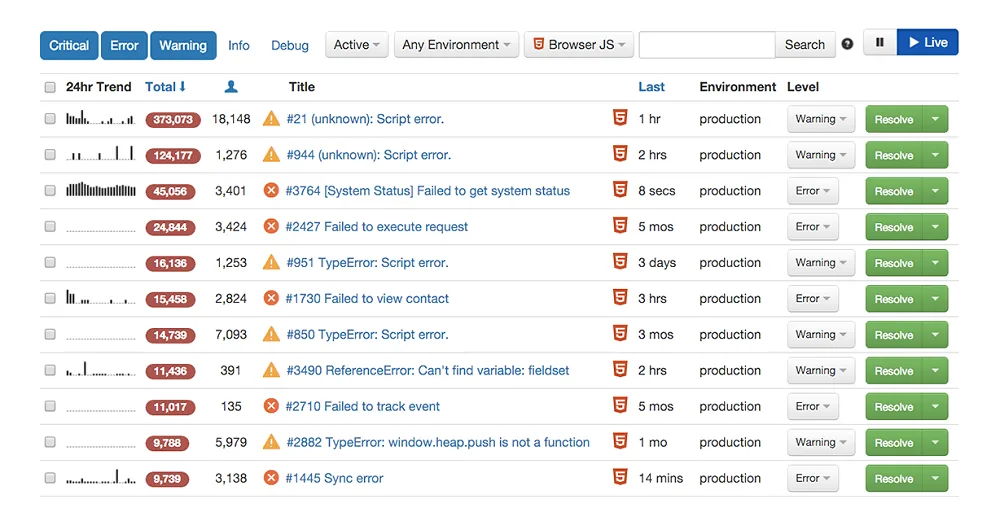
Rollbar Items board for a production project. The list shows ten Items ranked by total occurrences, each with a 24-hour trend sparkline, occurrence count, affected user count, environment, severity level, and a Resolve action.
For each new Item, CloudThinker:
- Classifies it — regression from a recent deploy, third-party dependency failure, user-input edge case, or genuinely new behavior.
- Correlates it against the deploy timeline, the diff at the originating commit, the affected user cohort, and the surrounding telemetry.
- Reproduces it inside Sandbox Isolation with synthetic inputs derived from the stack trace and source map — never replayed customer payloads. When no safe repro is possible, the MR says so plainly.
- Drafts a Merge Request with the Item link, stack trace, suspect commit, repro output, and the proposed diff. Items that are not worth a fix (flaky network errors, deprecated clients) get a proposed Rollbar triage rule with an expiration date instead — CloudThinker never writes the rule without approval.
- Verifies the post-deploy occurrence rate falls to the team's baseline. If it does not, the MR is reopened with new evidence attached.
The hand-off back to the team looks like this in chat — a short note describing the fix, a Merge Request card linked to the diff, and a follow-up offer the engineer can take or leave:
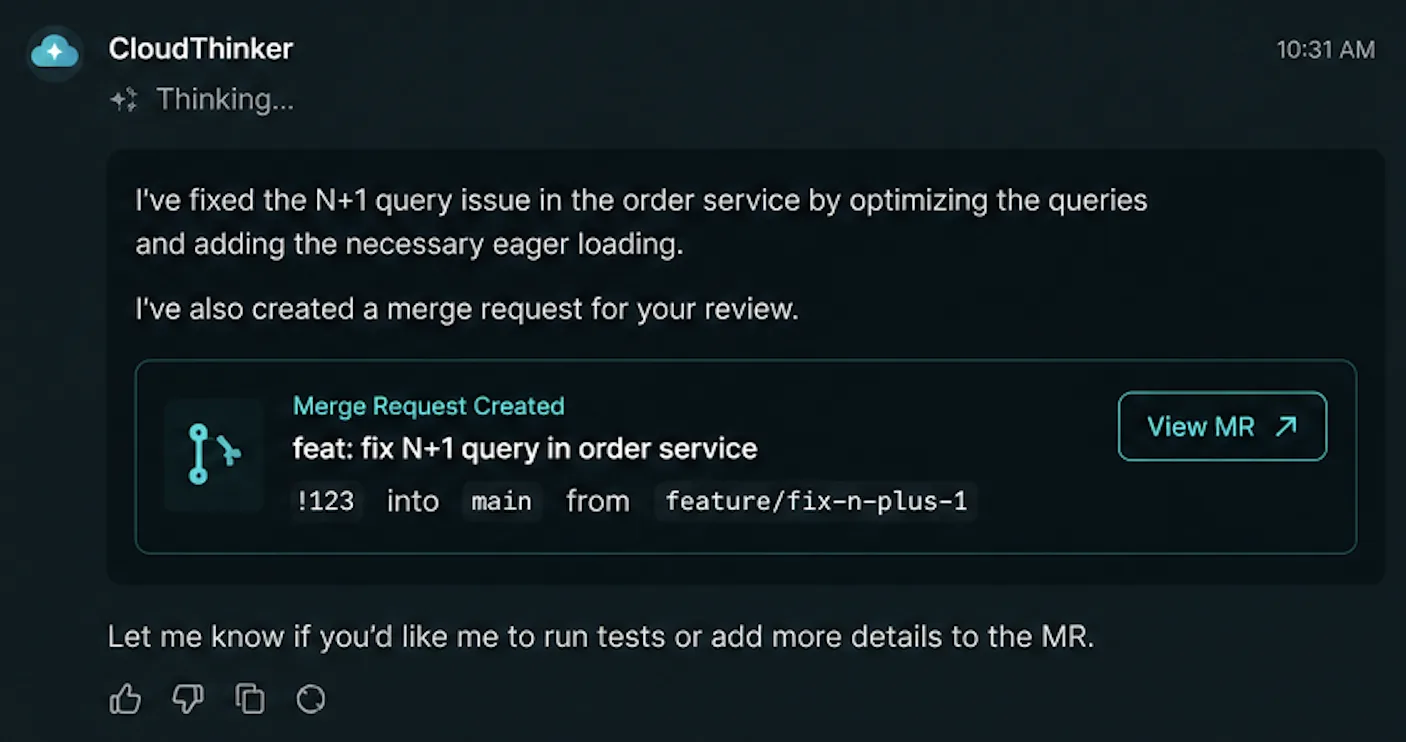
CloudThinker chat message after a fix run, showing a short description of the N+1 query fix in the order service, a Merge Request Created card with MR number !123, source branch feature/fix-n-plus-1, target branch main, and a View MR button.
CloudThinker never merges code, never deploys a service, and never writes a Rollbar triage rule on its own. Auto Mode gives you two levels — Notify (CloudThinker posts the triage, humans open the MR) and Act with approval (CloudThinker opens a draft MR, humans review and merge). Promotion is per-service, per-environment, and reversible from the same chat surface. Read-only scopes by default; write scopes (chat post, MR creation, Rollbar rule change) are granted explicitly during onboarding. CloudThinker runs under SOC 2 Type II and does not train on customer code, stack traces, or Item content.
Rollbar Item
A new error surfaces in production.
CloudThinker
Triages, correlates the deploy, drafts a fix.
MR Review
Diff lands in the team's MR queue, Item linked.
Deploy & Verify
Auto Mode gates. Occurrence rate confirmed to zero.
Memory. Every landed fix feeds back. The next Item with the same signature arrives with the prior fix proposed.
Setup: Rollbar → CloudThinker → Resolve by MR
Point Rollbar's webhook at the URL CloudThinker generates when you add the Rollbar Connection. Step-by-step with screenshots: CloudThinker Webhooks guide.
From there, CloudThinker handles the rest — every Item posted to the webhook runs the triage flow above, drafts a Merge Request, posts it back to your Slack or Microsoft Teams channel, and watches the post-deploy occurrence rate before marking the Item resolved in Rollbar. No agents installed inside your services; the webhook is the only inbound surface.
How customers win
- The Items queue stops growing. Triage runs after every deploy and the queue is drained between standups instead of piling up.
- Regressions stop hiding behind noise. Items that originate from a recent commit are classified and routed before the long tail of third-party signatures crowds them out — the on-call sees the one that matters first.
- Rollbar becomes the source of truth in practice. Items move new → in progress → resolved automatically as MRs open, merge, and the post-deploy occurrence rate falls. The dashboard stops lagging reality.
- Triage rules are written with reasoning, not just regex. Every silencing rule carries an expiration date and the evidence that justified it.
- Audit-ready change history. Every MR carries the Item link, the stack trace, the suspect commit, the repro output, and the reasoning behind the proposed fix — the same artifact pattern used during SOC 2 Type II audits.
- The on-call's daily habit shifts. Instead of scrolling the new since deploy tab manually, engineers describe what they want in chat — and triage genuinely new Items in the same channel.
How to try it
Three steps. None require write access to production on day one.
-
Connect Rollbar, the code repository, and the chat workspace — read-only first. CloudThinker Connections ships first-party integrations for Rollbar, GitHub, GitLab, Slack, and Microsoft Teams. The inventory and the first Notify-mode triage runs need nothing more.
-
Inventory your Rollbar estate. From Slack, Microsoft Teams, or the CloudThinker chat:
"Inventory every Rollbar project I have connected. Give me a per-environment Item breakdown and flag any project where new-Item count has grown more than 20% week over week."
- Run Notify-mode triage on one non-production project. No MRs opened, no Rollbar rules written — the team just sees what the triage summary would look like:
"For my staging Rollbar project, after every deploy, summarize new Items in #backend-oncall. Classify each as regression, third-party noise, edge case, or genuinely new. Notify only — do not write to Rollbar or open MRs."
When the team is ready, promote one service to Act with approval:
"For payments-svc only, promote the production Rollbar triage to act-with-approval. Open draft fix MRs for confirmed regressions, attach the Item link, stack trace, and suspect commit to the MR body, and wait for human review before merging."
Promotion is per-service and reversible from the same chat surface. Full reference at docs.cloudthinker.io.
Related reading
- CloudThinker Platform — architecture and primitives
- Auto Mode — graduated autonomy with safe defaults
- CloudThinker Connections — how CloudThinker reaches your stack
- Managed Cloud Service 24/7 — humans on strategy, CloudThinker on the pager
- CloudThinker documentation
To see the lifecycle running against your own Rollbar projects, visit the CloudThinker Platform, explore the documentation, or book a discovery call.
— Steve Tran, CTO, CloudThinker