CloudThinker × Terraform: Day-2 Operations for the Full IaC Lifecycle
Most Terraform programs don't fail at plan. They fail in the months after.
The first apply is easy. A platform engineer writes a clean module, the pipeline runs, the resources come up green. Then time passes. The cluster autoscaler edits node-group sizes. A database engineer lowers an Aurora capacity ceiling in the console during an incident because the on-call can't wait for a Merge Request. A file system provisioned in one throughput mode turns out wrong for the workload and gets switched by hand. The state file stops describing production, and the next plan either overwrites someone's hot-patch or quietly carries the drift forward.
This is the Day-2 gap. This post walks through why it opens, and how CloudThinker treats Terraform as a continuous lifecycle rather than a one-shot deploy, carried in the team's existing chat, code review and ticketing tools.
Why the state file drifts away from production
None of this is a Terraform flaw. Terraform does exactly what it says: it compares code, state and the cloud when someone runs it. The gap is everything that happens between runs.
Plans only run when someone opens an MR. If a workspace hasn't been touched in six weeks, nobody has asked Terraform what changed in six weeks. Drift accumulates silently and surfaces all at once, usually in the middle of an unrelated change.
The console is faster than the pipeline. During an incident, the shortest path is the AWS console. That's often the right call at 2 a.m. The problem is that nobody writes the change back to HCL afterward, so the next apply reverts the fix.
Some fields were never Terraform's to own. Autoscalers, managed upgrades and AWS-managed defaults change fields legitimately. Terraform will fight them on every plan unless someone tells it not to.
Reviewing a drifted plan takes domain knowledge. "Aurora max_capacity 8 to 4" is a one-line diff. Whether to accept it depends on utilization history, cost and who changed it and why. A plan doesn't carry any of that.
Knowledge stays in two heads. Which fields to ignore, which drift is expected after an EKS upgrade, which module the platform team prefers: that usually lives with two senior engineers.
Where CloudThinker meets Terraform
01Code and cloud
IaC estate
 GitLab or GitHubHCL, modules, Merge Requests
 AWS OrganizationsLive resource state and metrics
 Amazon EKSNode groups, addons, autoscaler
- Terraform stateThe last recorded intent
Nothing installed in the cluster
02Lifecycle
 CloudThinker
- Plan reviewPolicy and per-resource analysis
- Drift detectplan -refresh-only on a schedule
- ReconcileCode forward, cloud back, or ignore
- Right-sizeCapacity diffs from utilization
Runs in a sandbox
03Where the team works
Chat and MR queue
 Slack or TeamsDashboard and summary per run
- Merge RequestOne reconciliation MR per run
- ApproverA human on the merge button
Same pipeline as every change
CloudThinker plugs into the IaC repository, the cloud accounts and the team's chat workspace, and works across the full lifecycle of every Terraform resource:
- Author. When a developer drafts new HCL, CloudThinker proposes the approved module from the platform team's catalog before the resource is hand-rolled. Tags, IAM and observability defaults come with it.
- Plan. Every Merge Request goes through policy-as-code review and a per-resource analysis (database resources, EKS workloads, security posture) before the human reviewer sees the diff.
- Apply. The apply goes through Auto Mode, so you decide what runs on its own and what waits for approval.
- Drift detect. On a schedule, CloudThinker runs
terraform plan -refresh-onlyagainst the live cloud and produces a drift dashboard. - Reconcile. When drift is intentional, CloudThinker opens a Merge Request that brings the code forward. When it's accidental, it proposes the inverse.
- Right-size. Database capacity, EKS node groups and storage throughput are evaluated against actual utilization, and proposed HCL diffs land in the queue.
- Deprecate. When a resource has been idle, CloudThinker proposes a
terraform destroyplan and tags the change for a human approver.
Every step runs in CloudThinker's Sandbox, under the Guardrails Engine, and connects through CloudThinker Connections to GitLab, GitHub, AWS Organizations, Amazon EKS and the team's identity provider. Nothing is installed inside the customer cluster.
A drift run, end to end
01Detect
Refresh-only plan
Asks where live has moved away from state, without proposing changes to live.
02Evidence
Three sources
State, live API and telemetry for each drifted resource.
03Decide
Who owns the field
Adopt live, restore code, or hand the field to the runtime.
04Approved
Reconcile MR
One MR per run, each hunk linked to its evidence.
05Close
Clean baseline
The next run starts from state that matches production.
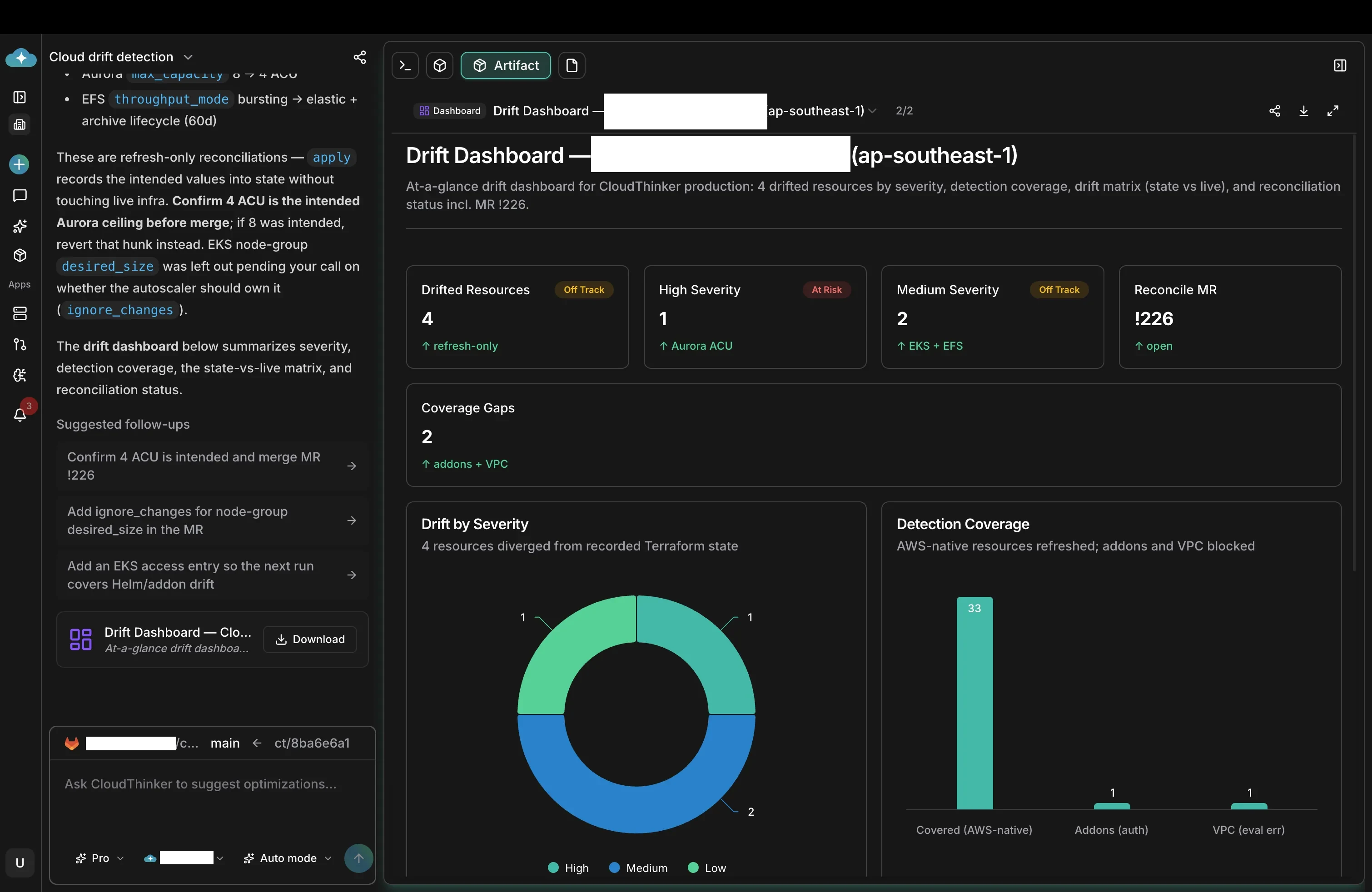
The screenshot below is what an on-call engineer sees at the end of a scheduled drift run: which resources drifted, how severe, and what was opened as a result. The depth lives behind it.
1. Ask where live has moved. CloudThinker runs terraform init inside the sandbox, then a refresh-only plan against the live AWS account:
terraform plan -refresh-only -out=drift.tfplan
terraform show -json drift.tfplan \
  | jq '.resource_drift[] | {address, actions: .change.actions}'
The -refresh-only flag is the safe way to ask "where has the cloud moved away from the state file?" It compares state with live and proposes no changes to live resources. In this run, four resources drifted: one high severity, two medium, one low.
2. Read each drift against its domain. Each one gets the evidence a reviewer would ask for (utilization figures here are illustrative):
- Aurora
max_capacity8 to 4 ACU (high). Someone lowered the Serverless v2 ceiling. CloudWatch shows peak usage under 3 ACU for 30 days, so 4 looks deliberate and safe. It could also be a mistake during an incident. CloudThinker can't know intent, so the MR says so: confirm 4 ACU is the intended ceiling before merge; if 8 was intended, revert that hunk instead. - EFS
throughput_modebursting to elastic, plus a 60-day archive lifecycle (medium). The two changed together, which fits: EFS Archive storage needs Elastic throughput. Access patterns support it. Adopt live. - EKS node group
desired_size(medium). The autoscaler changed it, and will again. Reconciling the number would fight the autoscaler on every plan. This one gets a different answer, covered below.
3. Surface what it couldn't see. Coverage gaps go in the report rather than under the rug. In this run, EKS addons were blocked on authentication (no access entry for the drift role yet) and the VPC module failed on an evaluation error. The dashboard shows both, and the follow-up proposes the access entry so the next run covers Helm and addon drift.
4. Open one reconciliation MR. For drift you want to keep, the MR updates the HCL to match live, and the state catches up with terraform apply -refresh-only, which writes live values into state without touching infrastructure. For accidental drift, the MR leaves the code alone and a normal apply puts the cloud back. Every hunk links to its detection, telemetry and policy check:
resource "aws_rds_cluster" "orders" {
  # ...
  serverlessv2_scaling_configuration {
    min_capacity = 0.5
    max_capacity = 4 # was 8; lowered in console, confirm intent before merge
  }
}

resource "aws_efs_file_system" "exports" {
  throughput_mode = "elastic"

  lifecycle_policy {
    transition_to_archive = "AFTER_60_DAYS"
  }
}
5. Post and wait. A summary lands in Slack or Microsoft Teams with the dashboard, the MR link and the open questions. The team reviews and merges, and the next scheduled run starts from a clean baseline.
Reconciling against the right source of truth
01Intent
Terraform state
What the last apply recorded. A memory, and the lowest authority of the three.
02Configuration
Live cloud
What the AWS API reports right now, including console hot-patches.
03Behavior
Telemetry
What the workload actually does: utilization, throughput, scaling history.
The same resource gets a different answer from each system that observes it. Terraform state remembers the last intent. The live cloud reports the current configuration. Telemetry records what the workload actually does.
When the three disagree, state has the lowest authority: it's a memory of intent, not a measurement. CloudThinker reads all three before recommending a reconciliation:
- Database resources are checked against state, the live RDS or Aurora API, and CloudWatch metrics before recommending whether a capacity ceiling goes up or down.
- Storage resources are checked against state, the live cloud and the workload's access patterns before recommending a throughput-mode or lifecycle change.
- Cluster workloads are checked against state, the live cluster and the autoscaler's history before recommending whether a field belongs in Terraform at all.
The output is a recommendation with the evidence attached, which a reviewer can accept, edit or reject. It's never just a number to merge.
Knowing when not to reconcile
Some fields belong to the runtime, not to IaC. An EKS node group's desired_size is the standard example: the cluster autoscaler edits it as workloads scale, and re-applying Terraform would fight it on every plan.
The right answer there is to take the field out of Terraform's hands:
resource "aws_eks_node_group" "workers" {
  # ...
  scaling_config {
    desired_size = 3
    min_size     = 2
    max_size     = 10
  }

  lifecycle {
    ignore_changes = [scaling_config[0].desired_size]
  }
}
The same logic applies to RDS minor versions with auto minor version upgrade on, EKS addon versions managed outside Terraform, and any other field an AWS-managed service or autoscaler owns by design. The MR explains the reasoning in a comment so the next engineer understands why the field is intentionally ignored. That judgment is what separates a domain-aware reviewer from a lint rule.
Why this beats the traditional workflow
| Traditional Terraform workflow | With CloudThinker | |
|---|---|---|
| Drift detection | Discovered in the next unrelated plan | Scheduled refresh-only runs with a dashboard |
| Evidence | A one-line diff with no history | State, live API and telemetry per resource |
| Runtime-owned fields | Fought on every apply | Moved to ignore_changes with the reasoning |
| Console hot-patches | Reverted by the next apply | Written back to HCL through a reviewed MR |
| Coverage gaps | Invisible | Reported with a fix for the next run |
| Knowledge | In two senior engineers' heads | Stored with each reconciliation and reused |
The deeper difference is that Terraform answers "what differs" and leaves "what should we do about it" to whoever is reading the plan. That second question needs utilization history, ownership and judgment about who owns each field. It's the work CloudThinker does before the MR reaches a reviewer.
Gated by design
CloudThinker reads freely (plans, state, live APIs, metrics) and posts the dashboard. Writes, from opening a reconciliation MR to applying a refresh-only plan, go through Auto Mode. A human always merges.
For teams that want the lifecycle without running the pipeline themselves, Managed Cloud Service 24/7 runs the same workflow under a managed on-call rotation.
From writing HCL to asking in chat
The change customers mention most is the team's daily habit. Developers who used to hand-write a resource block, and on-call engineers who used to patch through the console because the MR queue was too slow, now describe what they want in chat:
"I need an S3 bucket for the export pipeline: encrypted, tagged for the billing team, with a 90-day lifecycle to Glacier."
CloudThinker proposes an HCL diff using the platform team's approved S3 module, posts it in the same channel and opens a draft MR. The developer reviews, the platform engineer merges, and the bucket lands through the normal pipeline. The console hot-patches stop because the conversational path is faster than opening a tab.
CloudThinker also remembers. Every reconciliation, incident fix and approval is stored with its reasoning and outcome. When a similar pattern shows up (a drifted resource like one reconciled before, an addon authentication error that matches a past incident), the proposed MR arrives with a note like "this pattern was reconciled previously; reapplying the same fix", linked to the original case.
A typical week
Beyond scheduled drift runs, the same path (ask, propose, review, apply) covers the rest of the week:
An incident. An Aurora cluster crosses a CPU threshold. CloudThinker correlates the alert with recent metrics, proposes a capacity diff against the Terraform module and opens an MR linked to the incident ticket. The on-call approves, and the next maintenance window applies it.
A scheduled cost and posture review. Weekly or monthly, CloudThinker reports cost waste, right-sizing candidates, security posture changes and policy drift across every connected account. Each finding the team accepts arrives as an HCL diff in the MR queue, with no separate console to bounce between.
What changes for the team
- IaC stops going stale. Scheduled drift runs give the platform team a daily check on every workspace, turning "is the live cloud what we say it is?" from a quarterly audit into a continuous signal that catches issues before they become incidents.
- Drift becomes routine, not an incident. Reconciliation MRs land between standups. The on-call no longer discovers drift in the middle of a P1.
- The repository becomes the source of truth in practice. Plans go from "many changes I didn't make" to "the plan I'm proposing." Reviewers can trust the diff.
- Day-2 conversations move from blame to architecture. Right-sizing, lifecycle policies and module reuse become a running discussion in the MR queue.
- Cost optimization arrives as Terraform diffs. Idle resources, oversized capacity and missing lifecycle policies come back as HCL in the next reconciliation MR, not as advice in another console.
- Security posture is checked on every plan. CIS, SOC 2 and PCI guardrails run against the proposed plan before the apply is gated. A public S3 bucket, a
0.0.0.0/0ingress or a plaintext secret never reaches the state file. - Recurring reports run themselves. Drift summaries, compliance evidence, cost reviews and posture reports are generated on the team's schedule and delivered to the audit folder, the leadership channel or the SOC 2 Type II portal.
- Audit-ready change history. Every MR carries the dashboard, telemetry, policy report and reasoning, the same artifact pattern used during SOC 2 Type II audits.
"We leverage CloudThinker to re-organize and standardize our AWS Landing Zone infrastructure, so we can automate 80% of daily operation tasks with CloudThinker."
Tung Nguyen, Infrastructure Leader, F88
Getting started
The fastest path to a first drift run is three steps.
1. Connect the IaC repository and the AWS Organization. CloudThinker Connections has first-party integrations for GitLab, GitHub, AWS, Azure, GCP and Amazon EKS, and reaches the cloud through the identity provider the team already uses.
2. Inventory your Terraform estate. From Slack, Microsoft Teams or the CloudThinker chat:
"Inventory every Terraform workspace I have connected. Give me a per-region resource breakdown and flag any state that hasn't been refreshed in the last 24 hours."
3. Watch production for drift, propose only, so the team sees the dashboard before any reconciliation MR is opened:
"Run a Terraform drift check on production every hour. Post the dashboard to #platform-ops. Propose only: don't open reconciliation MRs yet, I want to review the first few runs by hand."
When the team is ready, let that one action run on its own:
"For the production drift check, open one draft reconciliation MR per run without asking first. Attach the dashboard and evidence to the MR body. Merging still needs human review."
Full reference at docs.cloudthinker.io.
Related reading
- CloudThinker Platform: architecture and primitives
- Auto Mode
- CloudThinker Connections: how CloudThinker reaches your stack
- Managed Cloud Service 24/7: humans on strategy, CloudThinker on the pager
- F88 case study
- CloudThinker documentation
Conclusion
Terraform was never the problem. The lifecycle around it was. With author, plan, apply, drift detect, reconcile, right-size and deprecate handled in the team's chat and code review, gated by Auto Mode and bound to the Guardrails Engine and CloudThinker's Sandbox, the IaC repository goes back to being the source of truth it was meant to be.
To see the lifecycle running against your own estate, visit the CloudThinker Platform, explore the documentation, or book a discovery call.
Steve Tran, CTO, CloudThinker