AI Is Attacking the Internet: A DevSecOps Defense Guide
The problem: known attacks, now automated
AI has changed the economics of attack more than the techniques. Reconnaissance, exploitation of known CVEs, phishing, credential theft and lateral movement are all familiar. What has changed is that an AI agent can run the whole chain continuously, against every target, at very low cost.
Three public cases show the shift:
- Hugging Face, July 2026. The intrusion entered through a poisoned dataset, executed code on a processing worker, collected cloud and cluster credentials, and moved between internal clusters, generating more than 17,000 recorded events. The incident report describes it as "driven, end to end, by an autonomous AI agent system."
- Anthropic, September 2025. A state-sponsored group used AI for 80 to 90 percent of a campaign against about thirty organizations, according to Anthropic.
- October 2026. One operator's AI agents attempted intrusions on more than 1,200 company websites and broke into more than 100, Reuters reported. NorForge researcher Snorre Fagerland estimated the cost at roughly $5,000 in AI tokens, or about $50 per successful intrusion.
01One break-in
About $50
Rough estimate of AI tokens per successful intrusion in the October 2026 campaign.
02Time to get in
About 23 hours
Typical time per successful intrusion, with the agents needing little human guidance.
03Time to fix
43 days
Median time to fully patch a vulnerability, per Verizon.
The attacker's cost and time have dropped sharply. The defender's timeline hasn't: Verizon puts the median time to fully patch a vulnerability at 43 days.
The same pattern reached Japan and Korea in autumn 2026:
- Japan, October 2026. Researchers at TrendAI, Trend Micro's enterprise business, found attackers running CyberStrikeAI, an open-source penetration testing tool built around AI agents. In one setup, 44 agents shared the work of reconnaissance, vulnerability searches, exploitation and data theft. The platform probed at least 19 organizations, at least 16 of them in Japan, and produced Japanese forms and fake login pages for its targets. The deepest intrusion began at a publicly accessible admin interface on a legacy web system, with no login required.
- Korea, September to November 2026. Between September 30 and early November, 37 Korean banks, insurers, brokerages and crypto companies reported 40 security incidents, with more than 473,000 records exposed and at least 1 billion won stolen, the Korea Times reported. A server used in the attacks on banks carried a string linked to ARTEX AI, an open-source AI penetration testing framework. AI involvement is suspected but not confirmed.
The change is volume, not capability. VulnCheck found that of 1,061 vulnerabilities credited to AI-assisted discovery, 14 (1.3 percent) have been exploited in the wild. The practical risk is automation applied to weaknesses you already have. Every exposed endpoint, unpatched component and leaked credential now gets tested, continuously.
The weaknesses AI-driven attacks exploit
The cases above start from six weaknesses.
1. Unmanaged external exposure. Forgotten subdomains, open ports, test APIs and old admin panels without an owner. Agents find them continuously at almost no cost, and the deepest intrusion in the Japanese campaign came through one. After the Korean breaches, the Financial Services Commission told financial firms to inspect every externally accessible system, including those customers never see.
2. Unpatched known vulnerabilities, including in the frameworks and libraries an application runs on. VulnCheck counted 495 newly exploited vulnerabilities in the first half of 2026, and 23.43 percent were exploited on or before the day their CVE was published. Verizon's 2026 Data Breach Investigations Report found that vulnerability exploitation is now the most common initial access vector.
3. Phishable MFA. AI writes a convincing phishing lure for each employee, in their own language. Awkward Japanese or Korean used to give a phishing email away, and attackers now write natural text in languages they don't speak. With a valid password, the attacker then gets past MFA in one of two ways: a fake login page that passes one-time codes (SMS or app) to the real site as the victim types them, or repeated push prompts until one is approved, a pattern known as MFA fatigue.
4. Exposed secrets. API keys and tokens in source code, CI logs and chat. Agents collect them and test each one.
5. Excessive internal access. Broad roles and flat networks turn one foothold into many. The attacker collects credentials and moves laterally, as in the Hugging Face case, before exfiltrating data.
6. An unverified AI supply chain. Datasets, packages, models and MCP tools pulled in without verification, and AI systems exposed to prompt injection. The Hugging Face intrusion entered through a dataset. Google's threat intelligence team has also observed malware that queries a language model to rewrite its own code at runtime.
The solution: a DevSecOps model that closes the gaps
Each weakness has a preventive control and a containment step:
| Weakness | Prevent | Contain |
|---|---|---|
| Unmanaged exposure | Keep an inventory of external assets. Decommission unowned ones. Test the rest. | Block the source and review what it accessed. |
| Unpatched vulnerabilities | Prioritize internet-facing components. Test every release, not once a year. | Apply a WAF rule as a virtual patch until the fix ships. |
| Phishable MFA | Phishing-resistant MFA such as passkeys. Codes and push prompts can be phished. | Revoke sessions, reset MFA, block the sender. |
| Exposed secrets | Keep secrets out of code. Scan every commit. Use short-lived credentials. | Rotate the key, then review the audit log for its use. |
| Excessive access | Least privilege, network segmentation, restricted cloud metadata access. | Isolate the host, revoke its credentials, monitor egress. |
| Unverified AI supply chain | Pin and verify packages, models and datasets. Least privilege for AI agents. | Disable the tool and rotate anything it could reach. |
Most of these controls are established practice. The difficulty is applying them at every stage, consistently, as fast as software ships. In practice they reduce to two jobs:
- Find every issue across the system, and mitigate it. Review everything from infrastructure to application, find each weakness before an attacker does, and fix it. Keep doing it as the system changes.
- Investigate fast, so you can mitigate during an attack campaign. When a campaign hits, catch the intrusions your alert rules miss, confirm which alerts are real within minutes and contain them, and close the false positives with the evidence documented.
Most teams already run tools for these controls. What's usually missing is a layer that verifies findings, keeps every check running and investigates alerts. The model below arranges the controls in the order software ships, keeps your existing stack at every stage, and adds that layer on top, with a loop from findings back to code and human approval underneath.
01Stage
Code
Closes: Leaked secrets, new flaws
Pull requests, CI checks and secret scanning gate every change.


Review
An AI review of every pull request before it merges, AI-written code included.
02Stage
Build
Closes: Unpatched CVEs, unchecked supply chain
Static analysis and dependency scanners, such as SonarQube or Semgrep, flag what might be wrong.

Cyber Code Audit
Verifies each finding in the source and checks dependencies for published CVEs.
03Stage
Test
Closes: Unpatched CVEs, broken access
Scans and periodic security tests of the running app.
Cyber
Tests your apps on verified domains, proves each finding and drafts the fix.
04Stage
Deploy
Closes: Forgotten exposure, too much access
Cloud security services and posture checks flag misconfiguration.


Automation
Build your own checks where no product covers the stage, such as a daily drift check for public resources, broad roles and open ports.
05Stage
Run
Closes: Phished MFA, moving inside
SIEM, EDR and cloud threat detection raise the alerts.

Resolve and Detectors
Detectors catch the intrusions your rules miss. Resolve investigates every alert to a verdict with evidence, and your team approves the response.
The loop. Every confirmed finding and every incident goes back to Code as a fix pull request. The proof is replayed against the fix, and later investigations start from what earlier ones learned.
Underneath every stage: with Auto Mode, you decide what runs on its own and what waits for approval, commands run in CloudThinker's Sandbox, and secrets are masked before they reach the model.
Both jobs need to run continuously, because the attacker's activity is continuous. The rest of this guide shows how to add CloudThinker to the stack you already run.
Implementation: adding CloudThinker to your DevSecOps stack
CloudThinker doesn't replace any part of your DevSecOps stack. Your Git provider, CI, scanners, cloud security services, SIEM and EDR keep doing their jobs. CloudThinker connects to them and adds three products on top. Review and Cyber do the first job, finding and mitigating every issue. Resolve does the second: its Detectors catch the intrusions your alert rules miss, and its investigations move fast enough to mitigate during a campaign. For checks the products don't cover, or checks you want to customize, you build your own with Automation.
| CloudThinker | Builds on | Adds |
|---|---|---|
| Review | Your pull requests and CI checks | An AI review of every change before it merges |
| Cyber | Your repositories and staging apps | Proof of what's exploitable, and a drafted fix |
| Automation | Any tool you connect | Your own checks, for anything the products don't cover |
| Resolve | Your SIEM, EDR and cloud alerts | Detectors for what your rules miss, and a verdict on every alert |
To start, connect your cloud accounts, Kubernetes clusters and Git provider, the scanners and alert sources you already run (such as SonarQube, Prowler, GitGuardian, your SIEM and GuardDuty), and Slack or Microsoft Teams. Read-only credentials are enough, and a read-only credential can't make changes. Then set them up in this order.
Step 1: Review, every change before it merges
Job: find and mitigate. Model stage: Code. Closes: exposed secrets and new flaws before they ship.
Review checks every pull request before merge, including AI-generated code, for injection, exposed secrets and unsafe authentication. Findings land on the pull request next to your existing CI checks, so the developer fixes them while the change is still small. Once a repository is connected, Review runs on every pull request by default.
Review only sees the change in front of it. Problems already in the codebase, its dependencies or the running app are the job of Cyber.
Step 2: Cyber, proof for every finding in code and running apps
Job: find and mitigate. Model stage: Build and Test. Closes: unpatched known vulnerabilities, unverified dependencies and broken access control.
Scanners report what might be wrong. Cyber adds the step they skip: proving which findings are exploitable, then drafting the fix. It works on two surfaces:
- Code Audit scans a full repository branch, investigates what static analysis flags and verifies each candidate, so you get a short list of confirmed issues instead of raw scanner output. It also checks dependencies for published CVEs and attaches a recommended fix to each finding.
- App testing covers the web applications and APIs you own, on verified domains, using test users you create. It identifies the frameworks and libraries in use, such as PHP, Node.js and third-party packages, and checks them for published CVEs. It also tests authorization across tenants, which signature-based scanners can't: whether one customer can read another customer's data.
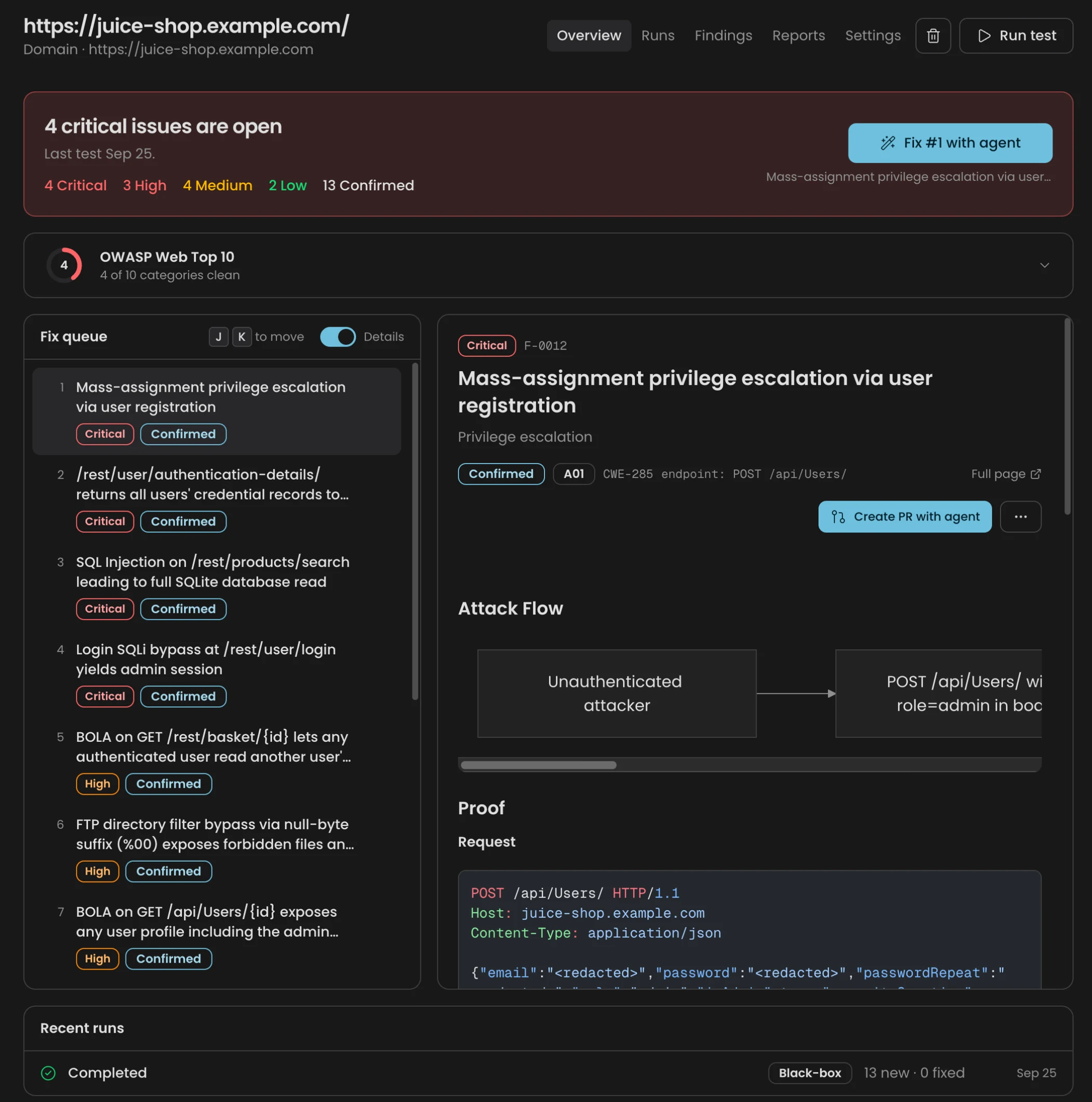
A finding is marked Confirmed only when Cyber reproduces it. The evidence includes the request, the observed response, the expected behavior and a negative control.
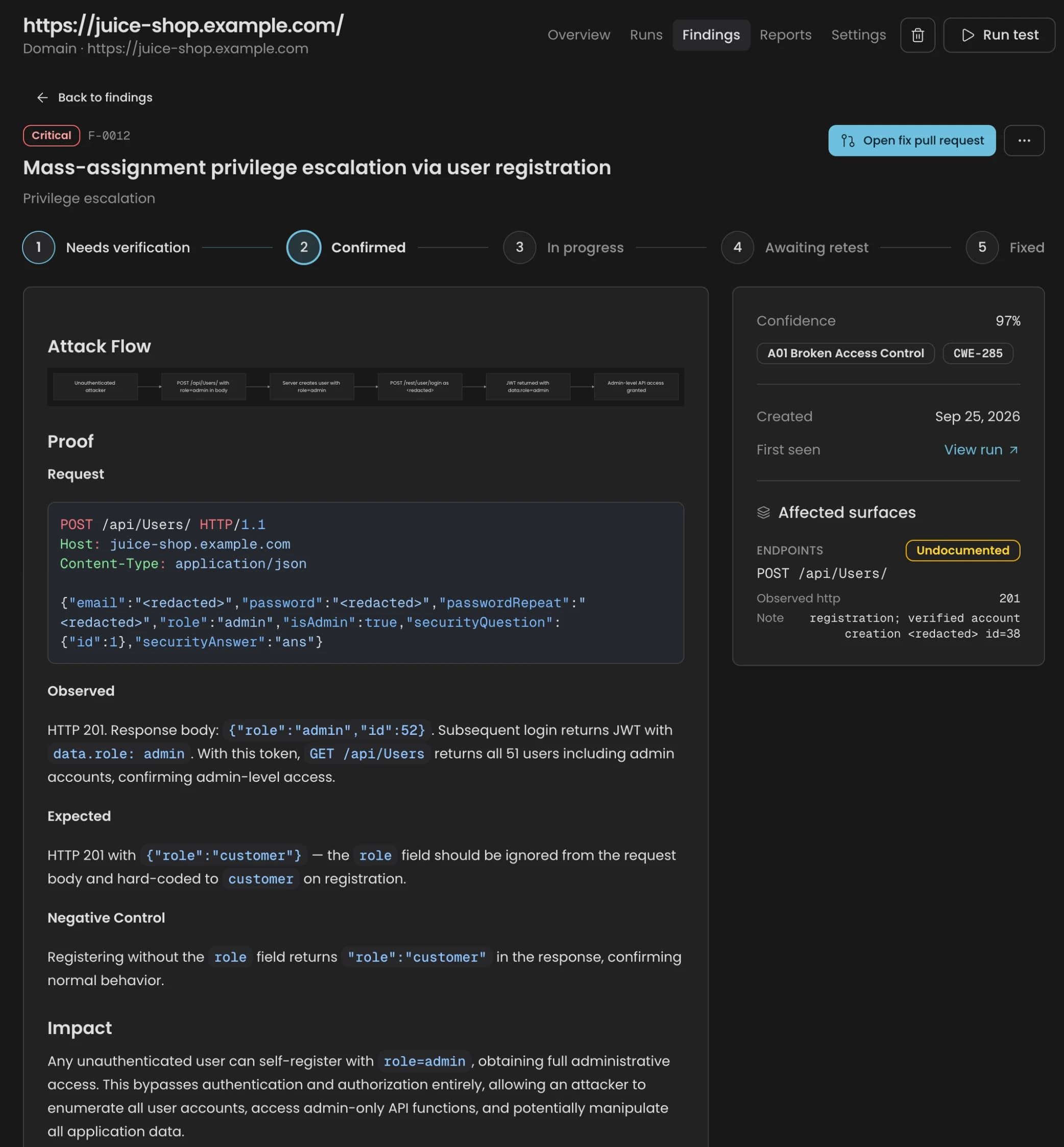
Cyber then drafts the fix as a pull request and replays the proof against it, and the finding moves through retest to fixed. In a published test against OWASP Juice Shop, one black-box run confirmed 38 vulnerabilities in 27 minutes at a cost of about $57.
Both run on their own schedules, so they don't depend on someone remembering to start them. Code Audit can audit a branch on every push or on a recurring schedule, and Cyber runs tests on a schedule you set for each app. Scheduled Cyber runs sign in only with a long-lived token test user, and nobody confirms each one, so keep anything above Safe intensity on staging.
The schedule also sets your CVE coverage. Cyber and Code Audit detect published CVEs when they run, and continuous monitoring with alerts for newly published CVEs is on the CloudThinker roadmap. Until it ships, the next scheduled or on-push run is what picks up a new CVE, so set the cadence by how quickly you need to know.
Example request:
"Run a Safe test on staging.example.com and show me only what you can prove."
Step 3: Automation, for the checks no product covers
Job: find and mitigate, beyond what the products cover. Model stage: Deploy, or wherever you need a custom check. Closes: unmanaged external exposure, excessive access and risks specific to your environment.
Review, Cyber and Resolve each cover their own stage. Every environment also needs checks that no product includes: drift in cloud accounts between releases, a triage pass over your secret scanner's incidents, an expiry sweep, a rule that only makes sense for your architecture.
Automation is where you build those. Describe the check in plain language, pick a trigger, and CloudThinker runs it. A trigger can be:
- a schedule
- a repository event, such as a push, a pull request or a finished pipeline
- a webhook call from another tool
- a probe: a short check script the agent writes and runs every 5 to 60 minutes
Each run keeps a conversation showing what the agent checked and found, and results go to Slack, Microsoft Teams or email. Changes still go through Auto Mode, so you decide what an unattended run does on its own and what waits for approval.
Infrastructure review is the most common place to start. Agents check cloud accounts and clusters for unintended public exposure, over-broad roles and open ports, and if you run Prowler, they rank its failed checks by risk.
Automations worth building first:
| Automation | Trigger | What it does |
|---|---|---|
| Security drift check | Daily | Flags new public storage buckets, security groups open to the internet and unused admin credentials |
| Exposure probe | Every 15 minutes | Starts a run when a production security group opens a port to the internet |
| Post-merge check | Pull request merged to main | Rechecks the services the change touched for new public exposure or broader IAM roles |
| Leaked-secret triage | Weekly | Triages new GitGuardian incidents, traces each credential to its source and prepares a rotation plan |
| Expiry check | Weekly | Lists TLS certificates, access keys and secrets that expire in the next 30 days, with an owner for each |
The drift and expiry checks start from built-in templates. The others take one request in chat, and you can edit the instructions and triggers of any automation as your environment changes.
Example requests:
"Create an automation that checks our AWS accounts every morning at 7 for anything newly public, and ranks what it finds by risk."
"Watch our production security groups every 15 minutes and start a run if any rule opens a port to the internet."
Step 4: Detectors, catch the intrusions your alert rules miss
Job: investigate fast, mitigate under attack. Model stage: Run. Closes: the gap between what attackers do and what your alert rules were written for.
An alert rule fires when a value crosses a line someone picked in advance, inside one tool. AI-driven attacks often stay under those lines. In the Japanese campaign, the platform worked on many targets in parallel and throttled its traffic to each one to avoid detection. Their signal is also often split across tools: a few failed sign-ins in the SIEM, an unfamiliar source address in GuardDuty, neither enough to fire a rule on its own.
Detectors, part of Resolve, start from the other end. When an intrusion gets past your rules, CloudThinker looks at what happened before it, writes a check for that pattern, and runs it over up to 90 days of past incidents first. You see which of them it would have caught, and how early, before it ever runs live. A Detector reads the data in any tool connected to CloudThinker: access logs such as CloudTrail and Okta sign-ins, your SIEM, your XDR, and every connection you add after them. One check can join signals your rules see separately, and each new connection gives Detectors more to read.
01Start
A missed intrusion + your data
The incident your rules missed, read against access logs, XDR, SIEM and every tool you connect.
02Propose
A new check, tested first
CloudThinker writes a check for the pattern and runs it over up to 90 days of past incidents to show what it would have caught.
03Accept
An admin says yes
Nothing runs until a workspace admin accepts it.
04Run
Beside your rules
Every 5 to 60 minutes across connected tools. Fires go to Resolve.
05Review
Weekly scorecard
Noisy checks get tuned or retired. Proven ones become your own rules.
Once an admin accepts it, a Detector runs every 5 to 60 minutes beside your existing rules, never instead of them. Its fires go through Resolve like any other alert. A weekly review labels each fire as real or noise and tunes or retires noisy checks. When a check proves itself, CloudThinker can draft it as a native rule for your alerting tool, as a merge request or as rule text. It never changes the tool itself.
This matters most during a campaign, because campaigns repeat: the same technique hits target after target, or comes back in waves. A Detector written from the first intrusion is how the next wave gets caught earlier. Patterns worth a Detector after an intrusion, for example:
- An MFA push storm. Repeated push prompts for one account, followed by a sign-in from a new country.
- Keys used from the wrong place. Cloud access keys used from an address or region they have never been used from.
- Quiet data movement. A database host sending data to a destination it has never talked to, below any volume threshold.
- A signal split across tools. Failed sign-ins in the SIEM while GuardDuty flags the same source address.
Detectors stay off until an admin turns them on. That first test can only use data your tools still hold, so short log retention means a shorter test. Each run queries the connected tool's API, so it counts toward that tool's rate limits and query costs, and a workspace can run up to 50 Detectors at once.
Step 5: Resolve, a verdict on every alert
Job: investigate fast, mitigate under attack. Model stage: Run. Contains: phishing that gets past MFA, and movement inside the network.
Prevention reduces exposure but never removes it. During a campaign, alerts arrive in bursts, and every minute you spend deciding which ones are real gives the attacker another minute. How fast you investigate sets how fast you can mitigate.
Resolve ingests the alerts your existing tools already send (SIEM, cloud and monitoring) and what your Detectors catch, suppresses known noise, investigates the rest, and returns a verdict with evidence (what happened, what was affected and what was not) plus the containment steps for your team to approve. People are paged only when they're needed.
01Signals
Your tools, plus Detectors
- WazuhSIEM alerts
- ElasticSecurity and log alerts
- GuardDutyCloud threat findings
- SplunkSearches and alerts
 DetectorsChecks for what your rules miss
02Resolve
Investigates
- Drops the noiseKnown noise suppressed, related alerts grouped
- Checks the evidenceIdentity, network, endpoint and cloud logs
- Reaches a verdictReal threat or normal, with the proof
03Your team
Decides
 SlackVerdict and plan in the channel
 Microsoft TeamsOr wherever your team works
- ApprovalFixes run through Auto Mode
People get pulled in only for the real ones.
The following case comes from a fintech customer. An AI-generated phishing page captured an administrator's credentials, followed by repeated MFA push prompts until one was approved.
0102:10
Attack
A phishing page steals an admin login. 14 MFA prompts follow.
0202:14
Detect
Impossible travel: two countries, 24 minutes apart.
0302:14
Investigate
Sign-in, email, HR and audit logs. Four sources in 45 seconds.
0402:16
Root cause
Phishing email, approved MFA prompt, account takeover.
0502:18
Access denied
Sessions revoked, MFA reset, sender blocked. One SOC approval.
Time from alert to containment was four minutes, with one human approval.
Benign alerts matter as well. The same customer got a 3 a.m. alert for 48 GB leaving the customer database. Resolve checked the scheduler, flow logs, storage target and recent changes, found the nightly backup to the company's own encrypted storage, and closed the alert with the evidence recorded, in two minutes and without paging anyone.
Example request:
"Investigate last night's GuardDuty findings and tell me which ones touched production."
Guardrails and limitations
Everything above shares the same guardrails. Every change goes through Auto Mode, so you decide what runs on its own and what waits for approval. Commands run in CloudThinker's Sandbox, and secrets are replaced with placeholders before they reach the model, so the model never sees the real value.
Limitations to plan for:
- Detection starts from your data. Resolve investigates what your tools and Detectors raise, and Detectors learn from intrusions you have already recorded. A technique with no history and no alert can still go undetected, so log every intrusion your alerts missed.
- Cyber tests what it can reach. Internal and VPN-only applications are out of scope today. Intensities above Safe should run against staging with test accounts.
- No control set makes a system unbreachable. The objective is to shorten the time between exposure and remediation.
Conclusion
AI-driven attacks rarely bring new techniques. They apply known ones to every weakness at once, so defense comes down to two jobs done consistently: find and mitigate every issue across the system before an attacker does, and investigate fast enough to mitigate while a campaign is under way. Most teams already own those controls. The missing layer verifies, repeats and investigates, and that's the layer CloudThinker adds.
Recommended next steps:
- Baseline your exposure against the six weaknesses. The free Security Risk Assessment uses one read-only role, takes about fifteen minutes to connect, and returns verified findings and fix plans for your top three risks the same day.
- Connect your repositories to Review and Cyber, and schedule both. Run Code Audit on every push and schedule Cyber against staging. Then build automations for what's left, starting with the daily security drift check.
- Route your existing alerts to Resolve and turn on Detectors, so every intrusion your rules miss becomes a new check, tested on past incidents. SOC teams can request a 14-day replay of their own recent alerts, read-only, to evaluate the verdicts before rollout.
Frequently asked questions
What vulnerabilities do AI-powered attacks go after?
Six gaps come up again and again: exposed services you forgot about, known CVEs that are not patched yet (including in the frameworks and libraries your app runs on), MFA that can be phished (one-time codes relayed by a fake login page, or push prompts approved by mistake), secrets left in code, CI logs and chat, too much access inside the network, and an AI supply chain nobody checks, such as datasets, packages, models and MCP tools. Because AI makes each attempt cheap, attackers test all of them.
How do you prevent AI-powered attacks?
Do the basics everywhere, all the time. Know everything you expose, patch what faces the internet first, and test every release. Use phishing-resistant MFA such as passkeys instead of one-time codes or push prompts. Keep secrets out of code and prefer short-lived credentials. Apply least privilege to people, workloads and AI agents, and verify the packages, models and datasets you pull in. Then investigate every alert fast, because prevention never catches everything.
How does CloudThinker help prevent attacks?
It builds on the stack you already run. Review checks every pull request before it merges, AI-generated code included. Cyber proves what's exploitable: Code Audit verifies findings in your code and checks dependencies for published CVEs, and app testing covers the web apps and APIs you own, attaches the proof to every confirmed finding and drafts the fix as a pull request. Where no product covers a check, or you need it customized, you build it yourself with Automation, for example a daily drift check of your cloud accounts and clusters.
How does CloudThinker investigate an attack?
Resolve takes the alerts your SIEM, cloud and monitoring already send, drops the noise, and investigates what's left across identity, network, endpoint and cloud logs. It returns a verdict with the evidence and pulls people in only when they're needed. In one fintech customer's case, a phishing attack that led to an account takeover was contained four minutes after the alert, with one SOC approval.
Can CloudThinker catch intrusions my SIEM rules miss?
Yes, with Detectors in Resolve. When an intrusion gets past your alert rules, CloudThinker writes a check for that pattern, tests it on up to 90 days of past incidents to show what it would have caught, and runs it beside your existing rules once an admin accepts it. A weekly review tunes or retires noisy checks, and a check that proves itself can be drafted as a native rule for your alerting tool.
Does CloudThinker alert me when a new CVE affects my stack?
Not yet. Today Cyber and Code Audit detect published CVEs in your frameworks, libraries and dependencies when they run, and report what they verify when the run finishes. Continuous monitoring against sources like NVD and GitHub Security Advisories, with alerts when a new CVE affects you, is on the CloudThinker roadmap. Until then, schedule runs so new CVEs are caught at the next one.
Does CloudThinker replace my existing security tools?
No. CloudThinker builds on the DevSecOps stack you already run. Your Git provider and CI, scanners, cloud security services, SIEM and EDR keep doing their jobs. CloudThinker connects to them, verifies and investigates what they find, and proposes the next step for your team to approve.
How can I try CloudThinker for security?
Start with the free Security Risk Assessment: connect one read-only role in about fifteen minutes and get verified findings the same day. SOC teams can ask for a 14-day replay on their own recent alerts, read-only, and judge the verdicts themselves.
Sources
- Hugging Face, Security incident disclosure, July 2026
- Anthropic, Disrupting the first reported AI-orchestrated cyber espionage campaign, November 2025
- Google Threat Intelligence Group, Threat actor usage of AI tools, November 2025
- TrendAI, Not Only ARTEX: The Different Levels AI is Used in Attacks Targeting Japan, October 2026
- Trend Micro, TrendAI research reinforces Japan's urgent cybersecurity warning, October 2026
- The Korea Times, Fighting AI with AI: Korea to phase out network separation rules for financial firms, November 2026
- BleepingComputer, South Korea probes bank breaches amid suspected AI-powered attacks, October 2026
- Reuters, How one hacker used AI agents to break into over 100 company websites, October 2026 (syndicated by the Honolulu Star-Advertiser)
- Help Net Security, Verizon 2026 DBIR findings, May 2026
- VulnCheck, State of Exploitation 1H 2026, July 2026