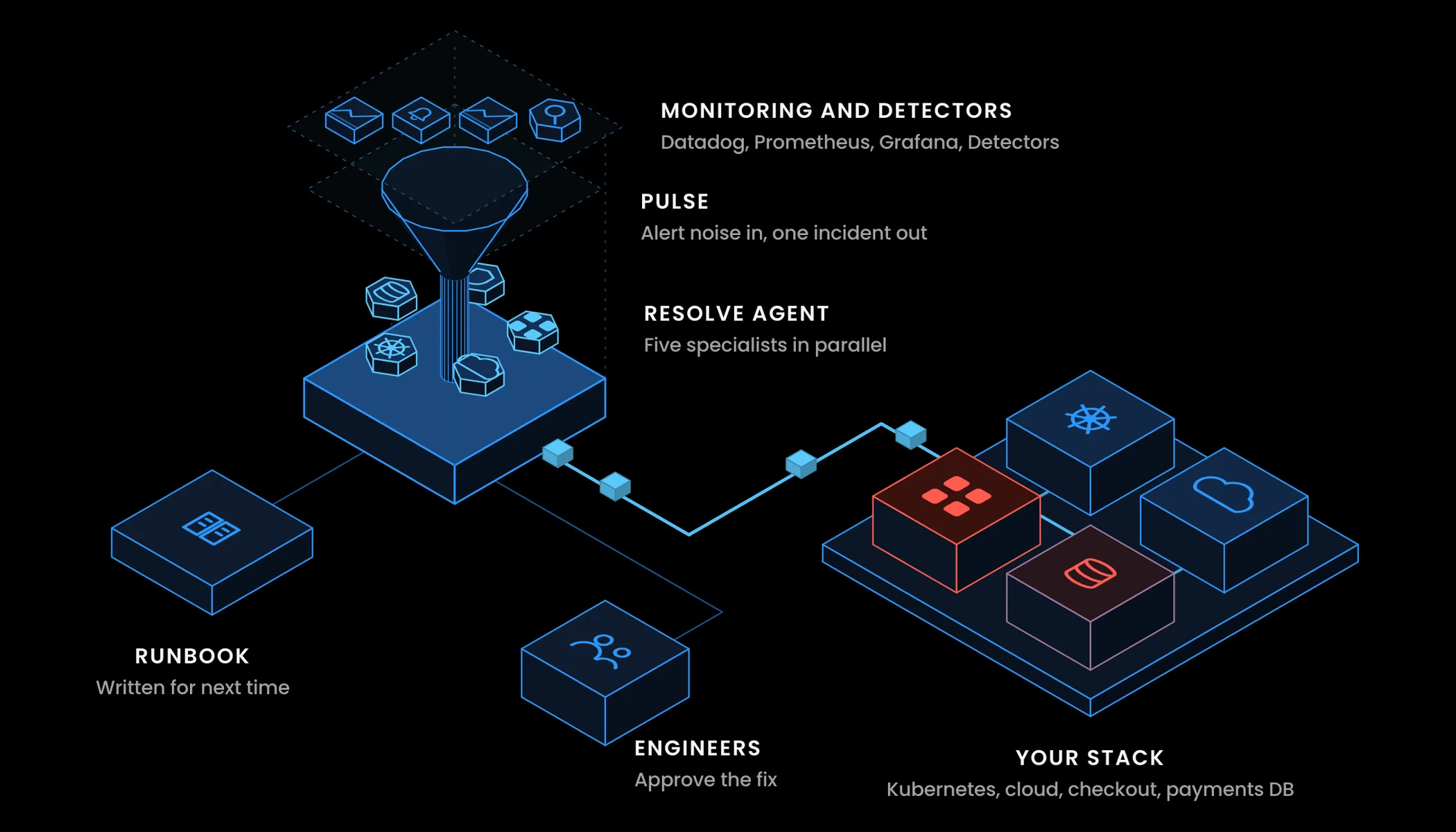
Introducing Resolve
Most platforms tell you something is wrong. Resolve tells you why, and has the investigation running before you open your laptop.
It's 3:14 a.m. and a page fires. By the time it reaches a phone, the monitoring stack has already produced a few thousand events that night. Most are duplicates, internal AWS bookkeeping or resources that flap every few minutes. Before anyone can investigate, the on-call has to work out which of those events is the one that woke them up. That triage is a job of its own, and it happens half asleep.
Three months ago we shipped CloudThinker Incidents on a simple premise: AI investigates, humans validate. It took teams from a 45-minute hunt to a sub-10-minute resolution. It worked, and it kept showing us the same gap upstream. Investigation can't begin until someone has picked the right alert out of the noise, and Incidents alone couldn't solve that.
So we built the layer before it. Today we're announcing Resolve, CloudThinker's end-to-end response loop. It's a rename and an expansion. What used to be Incidents is now one of two pillars in a single module: signal intelligence and AI investigation, joined by an explicit Memory layer. They run as one system, from the first event in your cloud to a resolved incident with a remediation log.
Why the traditional response chain breaks
None of this is about slow tools. It's about where the chain hands work to a person, and what that person has to do by hand.
Detection is per event. Every monitor, CloudTrail rule and GuardDuty finding fires on its own terms. Nine EC2 alerts about the same node pool arrive as nine pages, because nothing in the chain knows they share a cause.
Suppression is rule debt. Dedup windows, rate limits and maintenance mutes all work, once someone writes them. Each one is a static rule tuned for last quarter's traffic. The rules drift, the noise comes back, and the team learns to ignore a channel.
Correlation stops at grouping. Tools that group duplicates hand over a tidy list, and then the human starts from scratch: which service, which deploy, which dependency, which theory to test first.
Investigation is sequential. The cloud engineer checks the nodes, then hands to the database owner, then to whoever knows the Kubernetes config, then to security. A four-hour cross-team relay, mostly spent waiting for the next person to pick it up.
Knowledge leaves with people. The fix that worked last month lives in a Slack thread and one engineer's memory. The next on-call rediscovers it.
Two pillars, one loop
01Sources
Your stack
 AWSCloudTrail, GuardDuty, Cost Anomaly, Health, Config
 MonitoringDatadog, Grafana, New Relic, Prometheus
 PagingPagerDuty and generic webhooks
 ChatSlack and Teams alert channels
10+ sources, one feed
02Resolve
 Signals and investigation
- Signal intelligenceSuppress, correlate, classify every signal
- EscalateCritical, High or AI-actionable clusters
- InvestigateHypothesis-driven RCA with live reasoning
- RemediateRunbooks behind your approval gates
One loop, no handoff
03What stays
Memory
- ResolutionsRoot cause, evidence and the fix that worked
- Noise signaturesWhat Resolve learned to suppress
- Source syncStatus written back to the source platform
The next incident starts warm
Resolve has two named pillars. Each stands on its own. Together they close the loop.
A signal cluster becomes an investigation the moment it crosses the actionability bar. Investigation starts automatically. When the root cause is confirmed, the remediation step is searched, surfaced and, with your approval gates intact, executed. Every resolution feeds Memory, so the next similar incident starts with what the last one learned. No tickets, no copy-pasting between tools, no human relay in the middle of routine work.
Pillar 01: Signal intelligence
Most tools detect. Resolve decides what's worth waking you for.
Your monitoring stack already catches anomalies. CloudTrail flags a security event. GuardDuty detects unusual API access. Datadog notices a latency spike. A Slack channel pings about an EC2 instance flapping. Detection isn't the problem; volume is. Engineers spend more time triaging noise than fixing real problems.
Resolve sits in front of all of it.
01Raw events
13K
Cloud events streaming in overnight from 10+ connected sources.
02Signals
510
What is left after deduplication and seven suppression layers.
03Clusters
40
Correlated, AI-classified, ready for a person to look at.
It's an 8-stage pipeline (ingest, normalize, deduplicate, suppress, persist, correlate, classify, route) and it runs without anyone touching it.
01Ingest
Ingest, normalize
Every source lands in one schema, whatever its native format.
02Reduce
Dedupe, suppress
Duplicates, flaps, cascades and known noise signatures drop out.
03Group
Persist, correlate
Related signals from the same blast radius become one cluster.
04Decide
Classify, route
Category, canonical severity and an actionability verdict per cluster.
What that gives you in practice:
- 10+ sources, one feed. AWS (CloudTrail, GuardDuty, Cost Anomaly, Health, Config, Access Analyzer), Slack, Teams, Datadog, Grafana, New Relic, PagerDuty, Prometheus, plus generic webhooks. All unified, all normalized.
- Seven suppression layers. Deduplication, rate limiting, flapping detection, cascade silencing, noise signatures, snooze and severity normalization. They stack; you don't toggle between them.
- Auto-correlation into clusters. Nine EC2 alerts about the same node pool become one cluster, not nine pages.
- AI classification on every signal. Category, canonical severity and an actionability verdict. No hand-written triage rules.
- One-click escalation. Any cluster escalates to a full incident in one click. Critical, High or AI-actionable clusters escalate on their own.
There are no thresholds to maintain. Resolve learns what matters from the signals themselves and from your environment. The engineer's job is to look at clusters, not to configure filters.
Pillar 02: AI investigation
From the moment a cluster escalates, the investigation is already running.
If you've used CloudThinker Incidents, the foundation is the same and stronger now. Four capabilities define how investigation works inside Resolve:
- Hypothesis-driven RCA. Competing theories, tested against evidence, each with a confidence score.
- Transparent reasoning. No black box. Every query and every ruled-out theory is visible, live.
- Automated remediation. Runbooks executed under your approval gates.
- Memory. Every resolution teaches the next one.
The first incident is fast. By month two, teams feel the Memory part most: the hundredth incident of a known shape is close to free.
One incident, end to end
01Detect
Signal intelligence
Resolve turns thousands of events into a few dozen clusters.
02Analyze
Parallel RCA
Competing hypotheses tested across cloud, data, Kubernetes and IAM.
03Resolve
Scoped action
A remediation step from your runbooks, gated by Auto Mode.
04Validate
Verify and learn
Confirm recovery, then write the lesson to Memory for next time.
Here's how a night like the one above plays out. The example is illustrative, but every call in it is real.
1. Resolve reduces the night to one cluster. At 3:02 a.m., nine EC2 status alerts from one node pool, a Datadog latency monitor on checkout-api and a burst of RDS connection warnings land within four minutes of each other. Resolve deduplicates them, correlates them by blast radius into one cluster, and classifies it as High and actionable. It escalates on its own.
2. Context first. The investigation maps the affected services through your topology, pulls metrics from CloudWatch, Prometheus and Datadog, compares them to baseline, and lists recent deployments and config changes in the window.
3. Name the readings, then check each one. There are three plausible stories, and each predicts different data:
- Node pool capacity. If the nodes ran out of room, CPU and memory pressure on the pool should climb before latency does.
- A bad deploy. If a release caused it, latency should step up at a deploy timestamp, and only on the new version.
- Database exhaustion. If the database is the bottleneck, connections should hit the instance limit first and everything downstream should follow.
The investigation pulls the evidence for all three at once, rather than one engineer after another:
# Did connections hit the ceiling, and when?
aws cloudwatch get-metric-statistics \
  --namespace AWS/RDS --metric-name DatabaseConnections \
  --dimensions Name=DBInstanceIdentifier,Value=orders-db \
  --start-time 2026-05-20T02:30:00Z --end-time 2026-05-20T03:15:00Z \
  --period 60 --statistics Maximum

# Did anyone change the node group or scaling in the window?
aws cloudtrail lookup-events \
  --lookup-attributes AttributeKey=EventName,AttributeValue=UpdateAutoScalingGroup \
  --start-time 2026-05-20T02:00:00Z

# What did Kubernetes see on the checkout pods?
kubectl get events -n checkout --sort-by=.lastTimestamp
Node CPU stays flat until after latency rises, so capacity is a symptom, not the cause. No deploy landed in the window, and CloudTrail shows no scaling change. DatabaseConnections climbs to the instance limit at 2:58, four minutes before the first page, right when a batch job's schedule kicked in. The database reading survives; the other two are ruled out with evidence attached.
4. Resolve. The winning hypothesis is confirmed and the strongest evidence is curated into the incident. Remediation steps are generated from your runbook library, and the incident gets a disposition: IDENTIFIED, NOT_FOUND, FALSE_ALARM or ON_HOLD. Specialized investigation for cloud and AWS, databases, Kubernetes, and security and IAM runs in parallel, so what used to be a four-hour sequential relay takes two to ten minutes.
5. Remember. Once recovery is verified, Memory stores the root cause, the evidence and the fix. The next time connections spike behind a batch job, the investigation starts from that lesson instead of from zero.
What shipped today
Three things are new in this release, and they change how Resolve feels in production:
- Auto-RCA. Investigation starts itself the moment a cluster escalates.
- Incident Memory. Every resolution is retrievable by the next investigation.
- Hardened webhooks. 15+ platforms. Wire it once.
How it differs from the traditional approach
We've been direct about this in every conversation with prospects, so we'll be direct here.
| What other tools do | What Resolve does | |
|---|---|---|
| Alert volume | Detect events and flood you with all of them | Suppress about 98% of noise before paging |
| Routing | Wake the on-call for noise too | Page only Critical, High or AI-actionable clusters |
| Correlation | Group duplicates and stop | Form hypotheses, test them, score the answer |
| Investigation | Show data; humans investigate | Investigate in parallel across cloud, databases, Kubernetes and security |
| Timing | Post-mortem tooling for after the fire | Real-time investigation before a human opens a laptop |
| Knowledge | Leaves with employees | Memory persists; future incidents resolve faster |
| Source sync | One-way alert ingestion | Bidirectional sync with the source platform |
The deeper difference is the role each part plays. In the old model, tools display data and people do the detective work. Here the AI is the investigator, the human is the decision-maker, and the system is the long-term memory.
Gated by design
Resolve reads freely (metrics, logs, events, change history) and proposes. Remediation, from a restart to a scaling change to a config edit, goes through Auto Mode, so you decide what runs on its own and what waits for approval. Every action carries the cluster, the evidence and the reasoning that led to it.
Getting started
Resolve is available today for all CloudThinker customers. If you already use CloudThinker Incidents, you already have it: signal intelligence, Memory and the new automation features are part of the same module, under a clearer name and a reorganized navigation.
Setup takes minutes:
- Open Resolve in your CloudThinker dashboard.
- Connect a signal source: AWS, Slack, Datadog or one of the 15+ webhook integrations.
- Let it run in shadow mode for a day and watch the noise reduction.
- Configure your runbook library and approval policies.
- Flip the auto-escalation switch.
Then ask it things in plain language:
"What did you suppress overnight, and which clusters would have paged us without it?"
"Investigate the checkout latency cluster. Show each hypothesis you ruled out and the evidence for the one that's left. Propose only, change nothing."
"For staging only, let the stuck-worker restart runbook run on its own. Anything touching production still comes to me."
The next signal that lands triggers the loop end to end.
Related reading
- Resolve product page
- Auto Mode
- Introducing CloudThinker Incidents
- Why RCA takes hours
- Alert fatigue triage
The bottom line
Incident management has been stuck in the same pattern for a long time: people doing the detective work while tools display data, under a flood of alerts that buries the real signal. Resolve flips that. Signal intelligence decides what's worth waking you for. Investigation starts the moment it lands. Memory makes the next one faster.
Open Resolve or read the docs. To begin setup, contact your account team.