Best Practices: How to Build AI Skills That Actually Work for Your Business
Here's a mistake I've watched dozens of teams make.
They open the Skills Hub, find a Kubernetes cost-optimization skill that looks like exactly what they need, clone it, enable it and send the first message. The agent answers, but the answer is off. It references a connection that doesn't exist, uses terminology nobody on the team recognizes, and falls back to guessing where it should have measured.
They tweak the description, re-enable it, try again. Still wrong. An hour later the skill is disabled and the team is back to doing the work by hand.
The skill wasn't broken. The approach was. This post is the approach that works: build from a run you already trust, in your own environment, and widen its scope slowly.
The real problem is daily operations, not tooling
Most engineering teams don't lack monitoring. They're drowning in it.
The average enterprise runs 7 to 12 tools for cloud operations: monitoring, alerting, security, cost, CI/CD. Each one covers a corner. None covers the whole loop. So ops teams spend 60 to 80% of their time triaging alerts instead of fixing anything, SREs get paged at 2 a.m. for incidents that should have resolved themselves, and junior engineers stall because they can't cross-reference a deploy, a cost spike and a security finding in real time.
That's the work CloudThinker Skills are built for. A skill isn't a saved prompt. It's a complete workflow: detect the problem, analyze the cause, resolve it, check the fix held, and report with evidence. A cloned template is a starting point. A skill built in your workspace is the finished thing.
Why cloned public skills break
Public skills are written for everyone, which means they fit no one exactly.
They assume a generic environment. They don't know whether your cluster is prod-eks-us-east-1 or k8s-production, whether cost reports go to Slack or Google Docs, who's on call, what your severity scale is, or the 2019 naming convention your namespaces still follow. When a cloned skill meets your environment, it breaks in three predictable places:
01Tools
Wrong integrations
The skill calls a connection you never set up, or set up under another name.
02Scope
Wrong credentials
Accounts, regions and namespaces are assumed, and production is scoped tighter than the author expected.
03Context
No history
Your incidents, deploys and naming live in your workspace. A cloned skill sees none of it.
The third one is the expensive one. Your most useful skills don't call one tool. They cross-reference incident history with recent deploys, know which services face the internet and which sit behind a firewall, and connect a cost spike to a security event from four hours earlier. That context only exists in your workspace, built from your conversations, connections and data. Public skills are blueprints. Skills built where your context lives are the ones that do the work.
Want to see how connections and credentials supply that context? The Connections guide explains how CloudThinker links to your infrastructure securely.
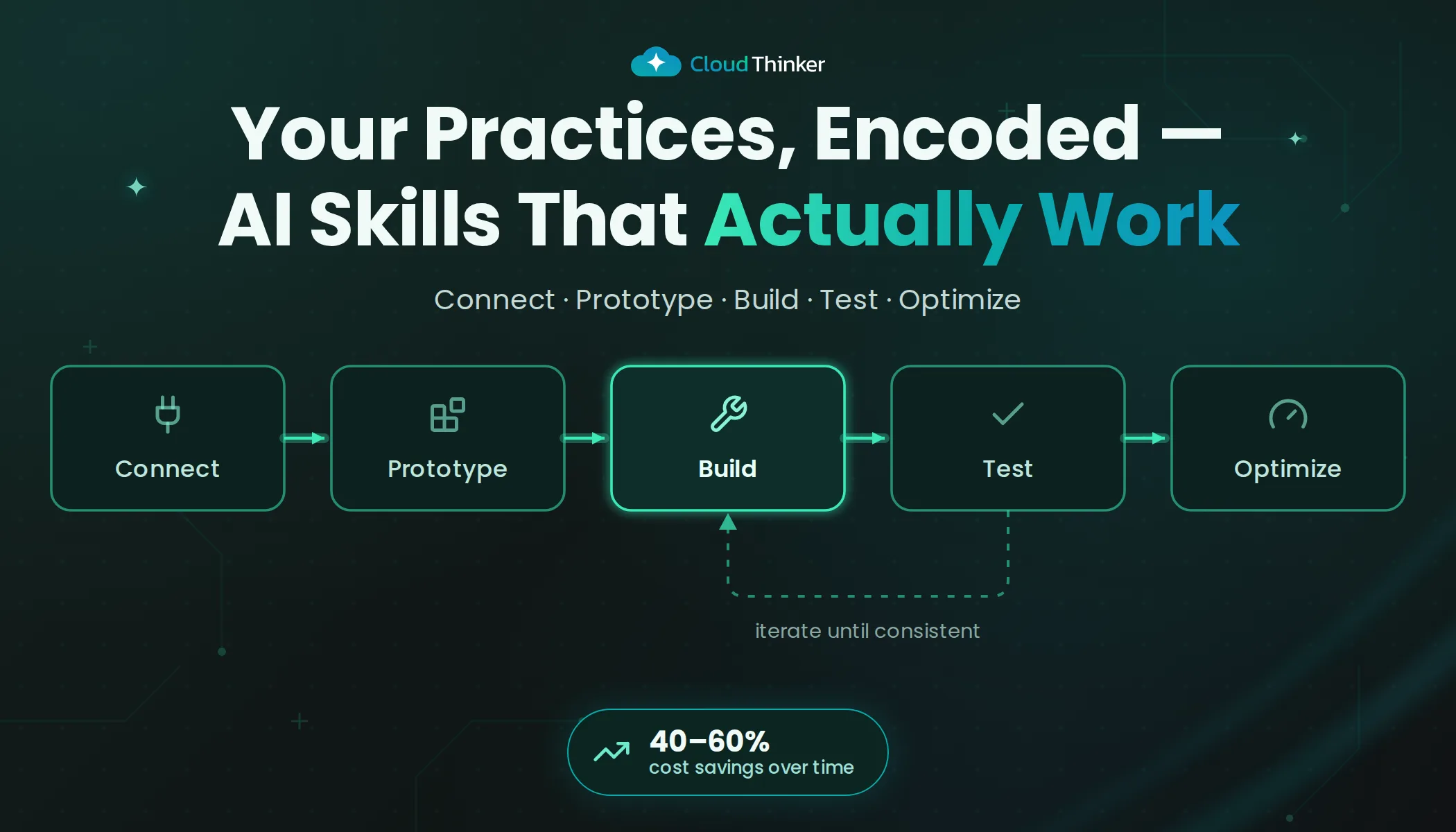
The build loop
01Connect
Tools verified
Every connection the workflow needs answers a freehand question correctly.
02Converse
One full run
Run the whole workflow in a single chat, first tool call to final output.
03Tune
Output you would send
Correct it live until the result needs no edits before it goes to the team.
04Extract
Write the skill
Turn the corrections into steps, tool calls and an explicit output format.
05Deploy
Replay and compare
Run the saved skill once and check it reproduces the chat result.
Every reliable skill I've seen came out of the same five steps, in this order. The order matters more than any single step.
Step 1: Connect your environment before writing a single instruction
The most common mistake is writing instructions before the environment is ready. You write beautifully structured steps, deploy the skill, and it fails because the AWS connection doesn't have the IAM scope the second step needs.
Before you write anything, check that:
- Every tool the skill will call is connected in the workspace.
- Credentials cover the right accounts, clusters and regions, not just the dev account you happen to have open.
- The connection actually returns data. A green dot in the connections list isn't proof.
The test I always recommend: ask for the task freehand before you encode anything.
"Pull the CPU utilization for my EKS nodes in us-east-1 over the last 24 hours."
If the agent stumbles here, you've found the gap while it's still visible. Inside a skill, the same gap turns into a quiet wrong answer.
Step 2: Run the full pipeline in one conversation
This is the rule that changes the outcome, and the one almost nobody follows.
The usual way: decide what you want, write instructions from memory, save, test, find a problem, edit, test again, until it sort of works. The way that works: complete the whole workflow in one conversation first, from the first tool call to the final formatted output, and correct it live as you go.
A skill is a distillation of a working pipeline. If the run needed three corrections to get the format right, a reminder to exclude dev namespaces and a nudge to include a missing field, those corrections are the most valuable part of the skill. Skip the live run and you package guesswork.
Step 3: Tune until you'd send it unedited
Keep going past "good enough". The bar is simple: would someone on my team look at this output and recognize it as ours? If it calls a P2 "medium priority" when your team says "high", or uses a severity scale you don't use, people will stop trusting it and quietly stop running it.
Step 4: Extract
Now write the skill from what worked. In practice that's four parts:
- Steps in the order the good run took them.
- Tools each step calls, with the scopes it needs.
- Rules you had to state out loud during the run ("exclude namespaces prefixed
dev-", "ignore spend under $50/day"). - Output format, spelled out. More on that below.
Step 5: Deploy and replay
Create the skill, run it once yourself, and compare against the conversation you built it from. If the two disagree, the instructions are missing something you said in chat. Fix that before anything is scheduled.
One skill, built end to end
Here's how this plays out on the workflow most teams hate: the Monday AWS cost review.
The freehand run. The first question is deliberately plain:
"Compare last week's AWS spend with the week before across all linked accounts. Show the five services with the biggest increase and tell me what changed in each."
Read the answer as a hypothesis test. A spend increase has a few readings, and each predicts something different. If it's a new workload, the increase shows up as new resource IDs. If it's a misconfiguration, the same resources cost more (data transfer, request volume, a storage class change). If it's a pricing effect, usage is flat and the rate changed (a Savings Plan or RI expired). A good run checks which reading fits instead of listing the deltas. The underlying query is the kind you could run yourself:
aws ce get-cost-and-usage \
  --time-period Start=2026-09-28,End=2026-10-05 \
  --granularity DAILY \
  --metrics UnblendedCost UsageQuantity \
  --group-by Type=DIMENSION,Key=SERVICE
Usage flat while cost climbs points to pricing. Usage climbing on existing resources points to configuration. New resource IDs point to a new workload, and that's when it's worth asking the deploy history.
The corrections. In a typical run the team adds three rules on the way: group by the CostCenter tag rather than account, skip the sandbox account, and flag any Savings Plan expiring in the next 30 days. Each one goes straight into the skill.
The extracted skill. As a SKILL.md, it ends up close to this. The Monday 08:00 timing lives in the automation that runs the skill, not in the file:
---
name: weekly-aws-cost-review
description: Use for the weekly AWS cost review, or when someone asks what changed in AWS spend week over week. Read-only.
---

## Scope

- All linked AWS accounts except "sandbox".
- Last 7 days against the 7 days before, by service and CostCenter tag.

## Steps

1. Compare cost and usage for both windows.
2. For the top five increases, classify each as new workload, configuration change or pricing change,
   using usage quantity, resource IDs and Savings Plan coverage as evidence.
3. Check deploys in the same window for any increase classified as new workload or configuration change.
4. List Savings Plans and RIs expiring in the next 30 days.

## Output

Render an Artifact dashboard: KPI cards at the top, one row per finding with its evidence, owners by CostCenter.
Two hours of Monday work becomes a dashboard waiting in the channel, and the format never drifts because the format is part of the skill.
How much a skill may do
The most important design decision in a custom skill is how much it's allowed to do on its own. The answer is almost never "everything, from day one". Skills act within Auto Mode, so you decide what runs on its own and what waits for approval.
When a skill runs is a separate choice from how much it may do. A read-only report like the Monday cost review, a morning security brief or a weekend idle-resource scan can run on a schedule from the start, because there's nothing to approve until it proposes a change.
Scope is the lever. When a skill's proposals get approved run after run without edits, widen what you ask it to do; until then, keep the request narrow. Rushing it is how you end up with a skill making confident changes nobody expected.
QA in your actual environment
Test the skill where it will run, not in a cleaned-up dev account with elevated credentials.
If the production AWS connection is read-only, the skill has to work within that. If EKS credentials are scoped to one namespace, the skill can't assume cluster-wide access. The most painful failures I've seen came from skills that passed in dev and broke quietly in production because of tighter scoping.
Three checks before you trust a skill to run on its own:
- Consistency. Run it twice on the same input. If the results differ in substance, an instruction is ambiguous somewhere.
- Resilience. Break something on purpose: a slow connection, a missing tag, a tool error. A good skill fails with a useful message. A bad one produces a confident answer that happens to be wrong.
- Format lock. If you asked for a markdown table, it never comes back as bullets. If you defined P1, P2 and P3, it never invents a "critical" tier that bypasses your alerting.
Build with Ultra, run with Light
01Build
Ultra (1.7x)
Reasoning depth for edge cases and for writing instructions precise enough to need no further reasoning.
02Run
Light (0.3x)
A proven skill carries the thinking in its steps, so execution only has to follow them.
This is the pattern that separates teams burning credits from teams building something that lasts.
Use Ultra (1.7x) to build and refine skills. It has the reasoning depth to work through multi-step workflows and edge cases, and to produce instructions precise enough that execution doesn't need further reasoning.
Use Light (0.3x) to run proven skills. Once the instructions are tight, the skill carries the thinking and the model follows the steps.
The math moves fast. One Ultra session builds a skill that runs on Light indefinitely. After three or four runs the build cost has paid for itself, and after twenty you've saved more than 5x what you spent building it. The bigger effect is compounding: with twenty to thirty mature skills running on Light, overall cost drops 40 to 60% without losing quality.
The model selection deep dive covers the full routing strategy: when to use each tier and how to optimize across a workspace.
Make the output usable with Artifacts
A common failure: skills that produce walls of text when someone needs to act in thirty seconds. A cost skill shouldn't dump raw CloudWatch numbers into chat. An incident skill shouldn't write seven paragraphs nobody reads under pressure. A security brief shouldn't be a flat list of 40 findings with no hierarchy.
Specify an Artifact as the output format. CloudThinker Artifacts turn skill output into dashboards, reports and diagrams that live next to the conversation instead of inside it. A cost analysis becomes a dashboard with trend lines, KPI cards and a breakdown by service. An incident timeline becomes a flow of what cascaded and when. A security brief becomes a prioritized scorecard.
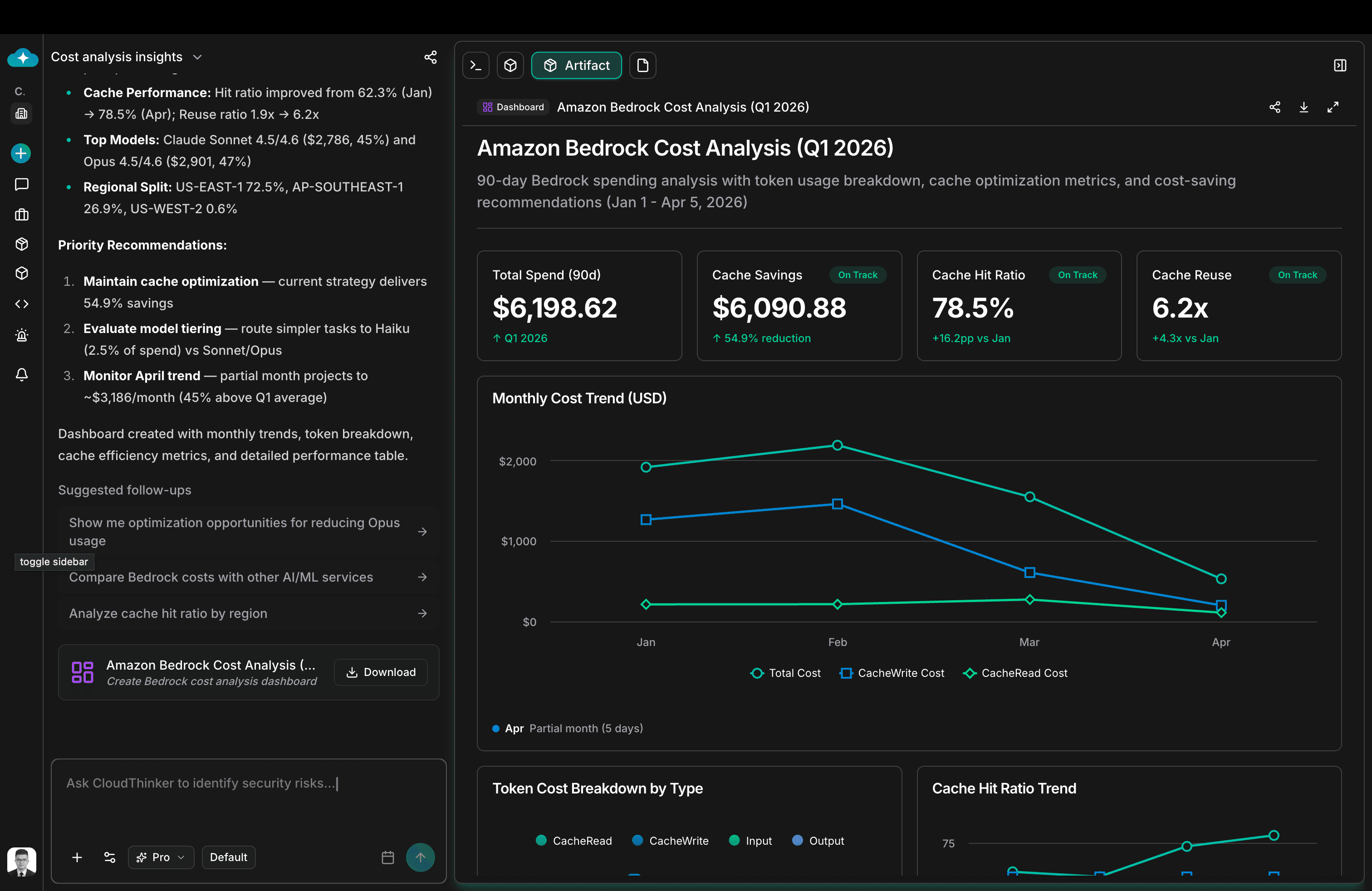
The screenshot shows it in practice. Cost data that could have been a paragraph of numbers renders as a named dashboard, Amazon Bedrock Cost Analysis (Q1 2026), with KPI cards, a monthly trend chart, a token breakdown and cache metrics. Someone in finance can read it without a CloudThinker account, and a VP can drop it straight into a QBR deck.
End the skill instructions with an explicit output directive:
- "Render the findings as an Artifact dashboard with KPI cards at the top and a trend chart below."
- "Produce an Artifact report with an executive summary, a findings table sorted by severity, and a recommended actions section."
- "Generate an Artifact diagram showing the incident timeline as a swimlane, one lane per affected service."
If you don't specify the format, you get whatever the model defaults to, usually raw text.
Skill or just ask?
Both feel like "tell the agent what to do". The difference is recurrence.
| Build a skill | Just ask in chat | |
|---|---|---|
| How often | Runs more than a handful of times | One-off investigation |
| Output | Must be identical in structure every time | Format doesn't matter yet |
| Path | Defined steps, and the order matters | Exploring, no known path |
| Trigger | Picked up automatically from what you ask, or on a schedule | You steer each turn |
| Cost | Built once on Ultra, run on Light | Reasoning paid on every run |
The gut check: will I need this exact output again next week? If yes, build the skill. If no, just ask.
Mature workspaces end up with 15 to 30 custom skills covering their most valuable recurring work, and plain conversation for everything else. That balance doesn't come from planning. It comes from starting with real pain and letting the library grow.
Browse the Skills Hub across every domain to see what well-structured skills look like, then build your own.
A skill is never finished
A skill you wrote three months ago is already slightly wrong. A new service went live, the team adopted a different severity scale, someone renamed the EKS cluster, and the anomaly threshold that made sense in January is noise in April.
Improving a skill is faster than building one, because the skill itself is your prototype. When the output feels off, don't disable it. Open a conversation, run the workflow freehand with the new context, and re-extract what changed. Usually it's one or two instructions.
Signals that a skill needs a refresh:
- People edit the output before sharing it. The format has drifted from what the process needs.
- It triggers on the wrong intent. The way the team asks has changed.
- It calls a connection that's been renamed, rescoped or replaced.
- A real incident happened that it would have caught with tighter instructions.
Review your top five skills once a month. It takes twenty minutes. The teams that get the most out of CloudThinker aren't the ones with the most skills. They're the ones whose skills keep improving, because every run is treated as feedback.
Getting started
Don't start by building ten skills. Start with the one workflow your team runs every week and dreads every time: the Monday cost review, the post-incident timeline nobody wants to write at midnight, the Friday security scan nobody knows how to prioritize.
1. Run it freehand on Ultra.
"Walk me through last week's top AWS cost increases across all accounts, classify each one as new workload, configuration change or pricing change, and show the evidence for each call."
2. Turn the run into a skill.
"Turn this conversation into a skill that runs every Monday at 08:00 and renders an Artifact dashboard. Propose only, change nothing."
3. Widen the scope once the proposals hold up.
"For the staging accounts only, let this skill delete unattached EBS volumes older than 30 days without asking. Everything in production still comes to me."
That's one skill and the proof of concept. The connected context, the wider scopes and the compounding savings follow once the first one works.
Start in your workspace at cloudthinker.io, or read the Skills Framework docs for the full structure. If you'd rather see the pattern live, book a walkthrough and we'll run it with your tools, your data and your workflow.